


ISO/IEC 18028-4:2005
(Main)Information technology — Security techniques — IT network security — Part 4: Securing remote access
Information technology — Security techniques — IT network security — Part 4: Securing remote access
The general objectives of ISO/IEC 18028 are to extend the IT security management guidelines provided in ISO/IEC TR 13335 by detailing the specific operations and mechanisms needed to implement network security safeguards and controls in a wider range of network environments, providing a bridge between general IT security management issues and network security technical implementations. ISO/IEC 18028-4:2005 provides guidance for securely using remote access - a method to remotely connect a computer either to another computer or to a network using public networks - and its implication for IT security. In this it introduces the different types of remote access including the protocols in use, discusses the authentication issues related to remote access and provides support when setting up remote access securely. It is intended to help network administrators and technicians who plan to make use of this kind of connection or who already have it in use and need advice on how to set it up securely and operate it securely.
Technologies de l'information — Techniques de sécurité — Sécurité de réseaux TI — Partie 4: Téléaccès de la sécurité
General Information
- Status
- Withdrawn
- Publication Date
- 12-Apr-2005
- Withdrawal Date
- 12-Apr-2005
- Drafting Committee
- ISO/IEC JTC 1/SC 27/WG 4 - Security controls and services
- Current Stage
- 9599 - Withdrawal of International Standard
- Start Date
- 31-Jul-2014
- Completion Date
- 14-Feb-2026
Relations
- Effective Date
- 12-May-2008

Get Certified
Connect with accredited certification bodies for this standard

BSI Group
BSI (British Standards Institution) is the business standards company that helps organizations make excellence a habit.

Bureau Veritas
Bureau Veritas is a world leader in laboratory testing, inspection and certification services.

DNV
DNV is an independent assurance and risk management provider.
Sponsored listings
Frequently Asked Questions
ISO/IEC 18028-4:2005 is a standard published by the International Organization for Standardization (ISO). Its full title is "Information technology — Security techniques — IT network security — Part 4: Securing remote access". This standard covers: The general objectives of ISO/IEC 18028 are to extend the IT security management guidelines provided in ISO/IEC TR 13335 by detailing the specific operations and mechanisms needed to implement network security safeguards and controls in a wider range of network environments, providing a bridge between general IT security management issues and network security technical implementations. ISO/IEC 18028-4:2005 provides guidance for securely using remote access - a method to remotely connect a computer either to another computer or to a network using public networks - and its implication for IT security. In this it introduces the different types of remote access including the protocols in use, discusses the authentication issues related to remote access and provides support when setting up remote access securely. It is intended to help network administrators and technicians who plan to make use of this kind of connection or who already have it in use and need advice on how to set it up securely and operate it securely.
The general objectives of ISO/IEC 18028 are to extend the IT security management guidelines provided in ISO/IEC TR 13335 by detailing the specific operations and mechanisms needed to implement network security safeguards and controls in a wider range of network environments, providing a bridge between general IT security management issues and network security technical implementations. ISO/IEC 18028-4:2005 provides guidance for securely using remote access - a method to remotely connect a computer either to another computer or to a network using public networks - and its implication for IT security. In this it introduces the different types of remote access including the protocols in use, discusses the authentication issues related to remote access and provides support when setting up remote access securely. It is intended to help network administrators and technicians who plan to make use of this kind of connection or who already have it in use and need advice on how to set it up securely and operate it securely.
ISO/IEC 18028-4:2005 is classified under the following ICS (International Classification for Standards) categories: 35.030 - IT Security; 35.040 - Information coding. The ICS classification helps identify the subject area and facilitates finding related standards.
ISO/IEC 18028-4:2005 has the following relationships with other standards: It is inter standard links to ISO/IEC 27033-5:2013. Understanding these relationships helps ensure you are using the most current and applicable version of the standard.
ISO/IEC 18028-4:2005 is available in PDF format for immediate download after purchase. The document can be added to your cart and obtained through the secure checkout process. Digital delivery ensures instant access to the complete standard document.
Standards Content (Sample)
INTERNATIONAL ISO/IEC
STANDARD 18028-4
First edition
2005-04-01
Information technology — Security
techniques — IT network security —
Part 4:
Securing remote access
Technologies de l'information — Techniques de sécurité — Sécurité de
réseaux TI —
Partie 4: Téléaccès de la sécurité
Reference number
©
ISO/IEC 2005
PDF disclaimer
This PDF file may contain embedded typefaces. In accordance with Adobe's licensing policy, this file may be printed or viewed but
shall not be edited unless the typefaces which are embedded are licensed to and installed on the computer performing the editing. In
downloading this file, parties accept therein the responsibility of not infringing Adobe's licensing policy. The ISO Central Secretariat
accepts no liability in this area.
Adobe is a trademark of Adobe Systems Incorporated.
Details of the software products used to create this PDF file can be found in the General Info relative to the file; the PDF-creation
parameters were optimized for printing. Every care has been taken to ensure that the file is suitable for use by ISO member bodies. In
the unlikely event that a problem relating to it is found, please inform the Central Secretariat at the address given below.
© ISO/IEC 2005
All rights reserved. Unless otherwise specified, no part of this publication may be reproduced or utilized in any form or by any means,
electronic or mechanical, including photocopying and microfilm, without permission in writing from either ISO at the address below or
ISO's member body in the country of the requester.
ISO copyright office
Case postale 56 • CH-1211 Geneva 20
Tel. + 41 22 749 01 11
Fax + 41 22 749 09 47
E-mail copyright@iso.org
Web www.iso.org
Published in Switzerland
ii © ISO/IEC 2005 – All rights reserved
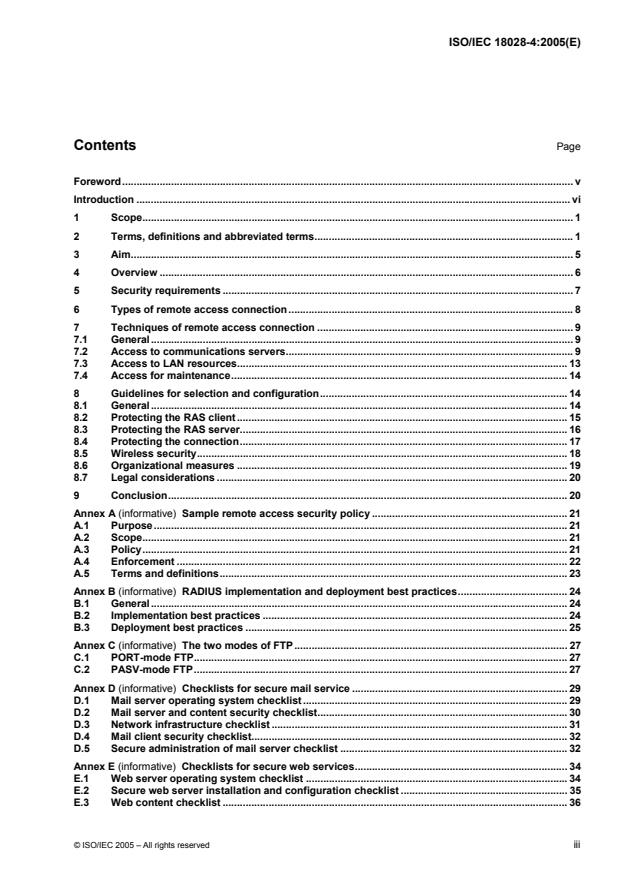
Contents Page
Foreword. v
Introduction . vi
1 Scope. 1
2 Terms, definitions and abbreviated terms. 1
3 Aim. 5
4 Overview . 6
5 Security requirements . 7
6 Types of remote access connection . 8
7 Techniques of remote access connection . 9
7.1 General. 9
7.2 Access to communications servers. 9
7.3 Access to LAN resources. 13
7.4 Access for maintenance. 14
8 Guidelines for selection and configuration.14
8.1 General. 14
8.2 Protecting the RAS client. 15
8.3 Protecting the RAS server. 16
8.4 Protecting the connection. 17
8.5 Wireless security. 18
8.6 Organizational measures . 19
8.7 Legal considerations . 20
9 Conclusion. 20
Annex A (informative) Sample remote access security policy . 21
A.1 Purpose. 21
A.2 Scope. 21
A.3 Policy. 21
A.4 Enforcement . 22
A.5 Terms and definitions. 23
Annex B (informative) RADIUS implementation and deployment best practices. 24
B.1 General. 24
B.2 Implementation best practices . 24
B.3 Deployment best practices . 25
Annex C (informative) The two modes of FTP. 27
C.1 PORT-mode FTP. 27
C.2 PASV-mode FTP. 27
Annex D (informative) Checklists for secure mail service . 29
D.1 Mail server operating system checklist . 29
D.2 Mail server and content security checklist. 30
D.3 Network infrastructure checklist . 31
D.4 Mail client security checklist. 32
D.5 Secure administration of mail server checklist . 32
Annex E (informative) Checklists for secure web services. 34
E.1 Web server operating system checklist .34
E.2 Secure web server installation and configuration checklist . 35
E.3 Web content checklist . 36
© ISO/IEC 2005 – All rights reserved iii
E.4 Web authentication and encryption checklist.37
E.5 Network infrastructure checklist .37
E.6 Secure web server administration checklist .38
Annex F (informative) Wireless LAN security checklist.40
Bibliography.42
iv © ISO/IEC 2005 – All rights reserved
Foreword
ISO (the International Organization for Standardization) and IEC (the International Electrotechnical
Commission) form the specialized system for worldwide standardization. National bodies that are members of
ISO or IEC participate in the development of International Standards through technical committees
established by the respective organization to deal with particular fields of technical activity. ISO and IEC
technical committees collaborate in fields of mutual interest. Other international organizations, governmental
and non-governmental, in liaison with ISO and IEC, also take part in the work. In the field of information
technology, ISO and IEC have established a joint technical committee, ISO/IEC JTC 1.
International Standards are drafted in accordance with the rules given in the ISO/IEC Directives, Part 2.
The main task of the joint technical committee is to prepare International Standards. Draft International
Standards adopted by the joint technical committee are circulated to national bodies for voting. Publication as
an International Standard requires approval by at least 75 % of the national bodies casting a vote.
Attention is drawn to the possibility that some of the elements of this document may be the subject of patent
rights. ISO and IEC shall not be held responsible for identifying any or all such patent rights.
ISO/IEC 18028-4 was prepared by Joint Technical Committee ISO/IEC JTC 1, Information technology,
Subcommittee SC 27, IT Security techniques.
ISO/IEC 18028 consists of the following parts, under the general title Information technology — Security
techniques — IT network security:
— Part 2: Network security architecture
— Part 3: Securing communications between networks using security gateways
— Part 4: Securing remote access
Network security management and securing communications between networks using Virtual Private
Networks will form the subjects of the future Parts 1 and 5, respectively.
© ISO/IEC 2005 – All rights reserved v
Introduction
In Information Technology there is an ever increasing need to use networks within organizations and between
organizations. Requirements have to be met to use networks securely.
The area of remote access to a network requires specific measures when IT security should be in place. This
part of ISO/IEC 18028 provides guidance for accessing networks remotely – either for using email, file transfer
or simply working remotely.
vi © ISO/IEC 2005 – All rights reserved
INTERNATIONAL STANDARD ISO/IEC 18028-4:2005(E)
Information technology — Security techniques — IT network
security —
Part 4:
Securing remote access
1 Scope
This part of ISO/IEC 18028 provides guidance for securely using remote access – a method to remotely
connect a computer either to another computer or to a network using public networks and its implication for IT
security. In this it introduces the different types of remote access including the protocols in use, discusses the
authentication issues related to remote access and provides support when setting up remote access securely.
It is intended to help network administrators and technicians who plan to make use of this kind of connection
or who already have it in use and need advice on how to set it up securely and operate it securely.
2 Terms, definitions and abbreviated terms
For the purposes of this document, the following terms, definitions and abbreviated terms apply.
2.1
Access Point
AP
the system providing access from a wireless network to a terrestrial network
2.2
Advanced Encryption Standard
AES
a symmetric encryption mechanism providing variable key length and allowing an efficient implementation
specified as Federal Information Processing Standard (FIPS) 197
2.3
authentication
the provision of assurance of the claimed identity of an entity. In case of user authentication, users are
identified either by knowledge (e.g., password), by possession (e.g., token) or by a personal characteristic
(biometrics). Strong authentication is either based on strong mechanisms (e.g., biometrics) or makes use of at
least two of these factors (so-called multi-factor authentication).
2.4
call-back
a mechanism to place a call to a pre-defined or proposed location (and address) after receiving valid ID
parameters
2.5
Challenge-Handshake Authentication Protocol
CHAP
a three-way authentication protocol defined in RFC 1994
© ISO/IEC 2005 – All rights reserved 1
2.6
Data Encryption Standard
DES
a well-known symmetric encryption mechanism using a 56 bit key. Due to its short key length DES was
replaced by the AES, but is still used in multiple encryption mode, e.g., 3DES or Triple DES (FIPS 46-3).
2.7
de-militarised zone
DMZ
a separated area of a local or site network whose access is controlled by a specific policy using firewalls. A
DMZ is not part of the internal network and is considered less secure.
2.8
Denial of Service
DoS
an attack against a system to deter its availability
2.9
Digital Subscriber Line
DSL
a technology providing fast access to networks over local telecommunications loops
2.10
Dynamic Host Control Protocol
DHCP
an Internet protocol that dynamically provides IP addresses at start up (RFC 2131)
2.11
Encapsulating Security Payload
ESP
an IP-based protocol providing confidentiality services for data. Specifically, ESP provides encryption as a
security service to protect the data content of the IP packet. ESP is an Internet standard (RFC 2406).
2.12
Extensible Authentication Protocol
EAP
an authentication protocol supported by RADIUS and standardised by the IETF in RFC 2284
2.13
File Transfer Protocol
FTP
an Internet standard (RFC 959) for transferring files between a client and a server
2.14
Internet Engineering Task Force
IETF
the group responsible for proposing and developing technical Internet standards
2.15
Internet Message Access Protocol v4
IMAP4
an email protocol which allows accessing and administering emails and mailboxes located on a remote email
server (defined in RFC 2060)
2.16
Local Area Network
LAN
a local network, usually within a building
2 © ISO/IEC 2005 – All rights reserved
2.17
modem
hardware or software that modulates digital signals into analogue ones and vice versa (demodulation) for the
purpose of using telephone protocols as a computer protocol
2.18
Multipurpose Internet Mail Extensions
MIME
a method allowing the transfer of multimedia and binary data via email; it is specified in RFC 2045 to
RFC 2049
2.19
Network Access Server
NAS
a system, normally a computer, which provides access to an infrastructure for remote clients
2.20
one-time password
OTP
a password only used once thus countering replay attacks
2.21
Passive mode
PASV mode
an FTP connection establishment mode
2.22
Password Authentication Protocol
PAP
an authentication protocol provided for PPP (RFC 1334)
2.23
Personal Digital Assistant
PDA
usually a handheld computer (palmtop computer)
2.24
Point-to-Point Protocol
PPP
a standard method for encapsulating network layer protocol information over point-to-point links (RFC 1334)
2.25
Post Office Protocol v3
POP3
an email protocol defined in RFC 1939 which allows a mail client to retrieve email stored on the email server
2.26
Pretty Good Privacy
PGP
a publicly available encryption software program based on public key cryptography. The message formats are
specified in RFC 1991 and RFC 2440.
2.27
Private Branch Exchange
PBX
usually a computer-based digital telephone switch for an enterprise
© ISO/IEC 2005 – All rights reserved 3
2.28
Remote Access Dial-in User Service
RADIUS
an Internet Security protocol (RFC 2138 and RFC 2139) for authenticating remote users
2.29
Remote Access Service
RAS
usually hardware and software to provide remote access
2.30
remote access
authorized access to a system from outside of a security domain
2.31
Request for Comment
RFC
the title for Internet standards proposed by the IETF
2.32
Secure Shell
SSH
a protocol that provides secure remote login utilising an insecure network. SSH is proprietary but will become
an IETF standard in the near future. SSH was originally developed by SSH Communications Security.
2.33
Secure Sockets Layer
SSL
a protocol located between the network layer and the application layer provides authentication of clients and
server and integrity and confidentiality services. SSL was developed by Netscape and builds the basis for TLS.
2.34
Security/Multipurpose Internet Mail Extensions
S/MIME
a protocol providing secure multipurpose mail exchange. Its current version 3 consists of five parts: RFC 3369
and RFC 3370 define the message syntax, RFC 2631 to RFC 2633 define message specification, certificate
handling and key agreement method.
2.35
Serial Line Internet Protocol
SLIP
a packet framing protocol specified in RFC 1055 for transferring data using telephone lines (serial lines)
2.36
Service Set Identifier
SSID
an identifier for wireless access points, usually in the form of a name
2.37
Simple Mail Transfer Protocol
SMTP
an Internet protocol (RFC 821 and extensions) for sending mail to mail servers (outgoing)
2.38
Transport Layer Security Protocol
TLS
the successor of SSL is an official Internet Protocol (RFC 2246)
4 © ISO/IEC 2005 – All rights reserved
2.39
Uniform Resource Locator
URL
the address scheme for web services
2.40
Uninterruptible Power Supply
UPS
usually a battery-based system to protect devices against power outages, sags and surges
2.41
User Datagram Protocol
UDP
an Internet networking protocol for connectionless communications (RFC 768)
2.42
Virtual Private Network
VPN
a private network utilising shared networks. E.g., A network based on a cryptographic tunnelling protocol
operating over another network infrastructure.
2.43
WiFi Protected Access
WPA
a specification for a security enhancement to provide confidentiality and integrity for wireless communications;
it includes the temporal key implementation protocol (TKIP). WPA is the successor of WEP.
2.44
Wired Equivalent Privacy
WEP
a cryptographic protocol offering stream cipher encryption with a key length of 128 bits; it is defined within the
IEEE 802.11 Wireless LAN specifications
2.45
Wireless Fidelity
WiFi
a trademark provided by the WiFi Alliance promoting the use of wireless LAN equipment
2.46
Wireless LAN
WLAN
a network using radio frequencies. The most common standards in use are IEEE 802.11b and 802.11g with
up to 11 Mbps respectively 54 Mbps transfer rate utilising the 2,4 GHz frequency band.
3 Aim
This part of ISO/IEC 18028 is intended to guide network administrators and IT security officers when
confronted with the problems of securing remote access. It provides information on the various types and
techniques for remote access and helps the intended audience to identify adequate measures to protect
remote access against identified threats.
It may also provide help to users who intend to access their office remotely from their home office or when
travelling.
© ISO/IEC 2005 – All rights reserved 5
4 Overview
Remote access enables a user to log on from a local computer to a remote computer or computer network
and use its resources as if a direct LAN link existed. The services used here are known as Remote Access
Service (RAS). RAS ensures that remote users can access the network resources.
In general, RAS is used in the following situations:
• to link individual stationary workstations (e.g., so that individual staff can work from home as
telecommuters),
• to link mobile computers (e.g., to support staff working in the field or on business trips),
• to link entire LANs (e.g., to connect local networks of remote locations or branch offices to a
corporate headquarter LAN),
• to provide management access to remote computers (e.g., for remote maintenance).
RAS offers a simple way to connect remote users in such scenarios: the remote user establishes a connection
with the main network e.g., over the telephone network using a modem. This direct connection may exist for
as long as is necessary and can be viewed as a leased line, which is only active on demand. It may also be
permanent when DSL or other adequate technology is used.
IMPORTANT: Remote access to an enterprise should always be directed through a remote access server; direct dial-in
into computers implies many risks and should therefore be omitted. Modems in enterprises should only be used at defined
locations.
Figure 1 — Remote Access to Resources
Establishment of a RAS connection generally requires three components as follows:
1. A local network component within the corporate network, which provides the RAS (i.e. RAS software has
been installed) and which is ready to accept RAS connections. This is known as the RAS server or
access server.
2. A remote computer on which RAS software has been installed and which initiates the RAS connection.
This is known as the RAS client. Remote clients may be workstations or mobile computers.
3. The communication medium over which the RAS connection is established. In most scenarios the RAS
client uses a telecommunications network to establish the connection. The very minimum that is required,
therefore, is a telephone line and a modem to go with it. Depending on the RAS architecture, different
connection technologies can be used server-side.
6 © ISO/IEC 2005 – All rights reserved
RAS is implemented as a client/server architecture: a RAS client may be configured so that it automatically
establishes the RAS connection when corporate network resources are required by dialling the phone number
of the computer on which the RAS server software is installed.
Alternatively, the user can initiate the RAS connection manually. Some operating systems also allow the RAS
to be activated immediately following system logon. Have in mind that a client system may be any kind of
computer (e.g., laptop, PDA, smart phone).
After connection establishment, a client system may use various applications; some of these may have
security implications.
5 Security requirements
From a security standpoint the RAS server and the RAS client are considered to be under control of a given
security policy while the communication medium is considered out of control and possibly in a hostile
environment. Security mechanisms concentrate on the risks that unauthorized entities (e.g. individuals or
processes) may
• gain access to the RAS client,
• gain access to the RAS server,
• block access to the RAS server (Denial of Service),
• eavesdrop on the information exchanged between the RAS client and the RAS server, and
• modify information in exchange.
The security services to counter these risks are confidentiality services, authentication services and access
control. Therefore, the following security objectives apply to RAS access:
Authentication: The remote user must be uniquely identified by the RAS system. The identity of the user
must be established through an authentication mechanism every time that a connection is established to the
local network. In the context of system access, additional control mechanisms must be employed to ensure
that system access by remote users is properly controlled (e.g., restricting access to certain times or to
permitted remote connection points only).
There are various methods of authenticating users and processes differing in quality and technology. The
most common, but also the most vulnerable, method is the use of passwords.
Access control: Once the remote user has been authenticated, the remote access server must be able to
restrict the interactions of the user with the network. This requires that the authorisations and restrictions,
which have been specified for local network resources by authorised administrators, be also enforced for
remote users in addition to any specific restrictions for remote users (e.g., specific daytime period, one
connection per user).
Security of communications: Where local resources are accessed remotely, user data have also to be
transmitted over the established RAS connection. In general the security requirements, which apply in the
local network with regard to protection of communications (confidentiality, integrity, authenticity) must also
be implementable for data transmitted over RAS connections.
However, protection of RAS communications is especially critical since communications can be transmitted
using a number of communications media and protocols, which cannot generally be assumed to be under the
control of the operator of the local network.
Availability: Where remote access is used for mainstream business activities, the availability of RAS access
is particularly important. The smooth flow of business processes may be impaired in the event of total failure
of RAS access or if connections have insufficient bandwidth. This risk can be reduced to a certain extent
© ISO/IEC 2005 – All rights reserved 7
through the use of alternative or redundant RAS connections. This applies especially where the Internet is
used as the communications medium, as here there are generally no guarantees of either connection or
bandwidth.
The client/server architecture of RAS systems means that both the RAS client and the RAS server are
exposed to specific risks due to the type of operational environment and the manner of use.
RAS clients do not have to be stationary (e.g., home PC), but may also be mobile devices (e.g., laptops).
However, the client location will normally not be under the control of the LAN operator so that, especially
where the client is mobile, it must be assumed that the environment is insecure and is exposed to specific
threats. In particular, the threats, which have to be considered here, include physical threats, such as theft or
damage.
RAS servers are generally part of the LAN to which remote users wish to log on. They are under the control of
the LAN operator and can therefore be covered by the security provisions, which apply locally. As the main
task of the RAS server is to ensure that only authorised users can access the connected LAN, the threats to
which the RAS server is exposed should be viewed as falling within the area of attacks where the objective is
unauthorised access to the LAN.
6 Types of remote access connection
There are various ways of establishing a connection between a client and computers in the remote LAN:
• Direct dial-up to the access server;
• Dial-up to an access server of an Internet Service Provider (ISP) and access to the remote LAN over
the Internet;
• Non-dial-up access by means of permanent connections to another network.
The following figure (Figure-2) shows these types of remote connections; mobile user 2 accesses the LAN via
an ISP and the Internet and is filtered by a firewall which controls access between the Internet and the local
network. Mobile user 1 could also be a WLAN user; then the RAS is called Access Point (AP). This access
server is also controlled by the firewall (dotted line).
NOTE Mobile users may be using dial-up, leased line, broadband or wireless connections.
The situation with so-called “WLAN hot spot” is described through mobile user 2 accessing a WLAN access
point instead of using a local modem. This means, that general Internet access is provided via the WLAN AP
and an ISP.
There are a variety of methods that a client may use to connect to an ISP. The client may use wired and/or
wireless technologies. Depending on the methods used, additional risks may occur, e.g., a WLAN requires
that specific security measures be applied in order to keep confidentiality.
These methods offer specific pros and cons which have to be taken into account. For example, direct dial-up
is intended to ensure that only authorised users who know the dial-up number may access the network
remotely. However, tools scanning for accessible dial-up numbers (war dialers) help hackers to identify
existing modems actively waiting for incoming calls. Internet dial-up provides a per-call advantage for the
remote user. The user may access local ISPs to connect to the remote LAN. However, this connection method
may require more complex and expensive server set-up and configuration.
8 © ISO/IEC 2005 – All rights reserved
Figure 2 — Types of Remote Access
7 Techniques of remote access connection
7.1 General
Remote access should only be provided following a need-to-know principle. Therefore, an enterprise has to
determine, which systems and which applications shall be accessible from the outside world by which user.
The type of remote access should be defined by the service used remotely.
7.2 Access to communications servers
7.2.1 General communications protection
The most common access provided is the access to the communications services within an enterprise, i.e.
access to a user’s email account, to an FTP server or to a web server. Annex D provides checklists on the
implementation and operation of a secure mail server and Annex E helps in setting up and administering a
web server securely.
There are various ways to protect the communication between a server and a client, thus providing
authenticity, confidentiality and integrity services, such as:
a) Secure Sockets Layer (SSL) provides a method of authenticating the communicating parties (client and
server authentication) and encrypting the information exchange between those parties. SSL is supported
by any Internet Browser and web server as well as by almost all operating systems. The Internet
Engineering Task Force (IETF) has developed the Transport Layer Security Protocol (TLS), which is
based on SSL, as an Internet Standard (RFC 2246) for protecting client/server communications.
b) IPsec (Internet Protocol Security) provides ways of authenticating the communicating partners as well as
protecting the transferred information. IPsec also offers functions to deal with key management issues
(see also RFC 2401, “Security Architecture for the Internet Protocol”).
© ISO/IEC 2005 – All rights reserved 9
c) Secure Shell (SSH) is a protocol for secure remote login and other secure network services over an
insecure network. It establishes a secure communications link after a successful authentication of the
remote user and provides a set of commands and services (e.g., secure file transfer).
These methods provide secure authentication and confidentiality and integrity services and should be used in
addition to the communications software. Due to the fact that SSL is part of commonly available Internet
browsers, web mail access may be easily protected by establishing an SSL connection prior to accessing a
user’s email account.
A major difference between these methods lies in the fact that SSL/TLS and IPsec are usually provided as
underlying communications functionalities thus being a security network service and SSH being a security
application.
These techniques are also applicable for connecting an FTP client to an FTP server thus allowing access to
data stored on that server.
Note: Many Internet protocols, e.g., telnet providing terminal access capabilities or FTP allowing file transfer, do only
implement weak authentication mechanisms, and do typically send password information in clear text. Tunnelling such
protocols through secure protocols such as SSH, SSL/TLS or IPsec provides not only confidentiality but also provides
substantial improvement for the authentication process.
Note that many web servers make use of SSL/TLS in only providing server authentication for the user but not
vice versa, which requires the user to verify the server certificate.
7.2.2 Protecting electronic mail
Although email is a service whose messaging in general does not provide confidentiality, specific prerequisites
have to be met to allow access to mail servers from outside. A common way to provide access to an email
server is to offer a web interface to the mail accounts, which allows users on the road to access their emails.
This method only requires a computer with a browser; i.e. it may be used on any computer available. On the
other hand, this method is not intended to let users download their mail and answer it off-line.
Other approaches allow users to make use of their standard email clients but still do not provide sufficient
confidentiality and privacy due to the concepts of email protocols. In general, an email client accesses a post
office (i.e. the common program administering all incoming email accounts) by authenticating itself and the
user behind in clear text. The two mail access protocols in use (POP3 and IMAP4) primarily differ in the way
they treat received email:
• POP3 downloads all new email available and a user can work with it locally,
• IMAP4 allows a user to download only the mail headers and decide afterwards which mail to download to
the local machine.
Due to the fact that these protocols alone do not provide sufficient security mechanisms, strong authentication
and transmission confidentiality have to be provided additionally (e.g., SSL, SSH).
Note: You may also protect email contents (this excludes sender address, recipient address and subject line). The two
main specifications are PGP (Pretty Good Privacy) and S/MIME (Secure Multi-Purpose Information Message Exchange),
which both provide services for confidentiality, integrity, authenticity and non-repudiation of origin. Both can be integrated
appropriately into many email client programs. Neither protects against traffic analysis because sender and recipient
addresses are transferred in clear text.
An email server accessible by remote users should be located in the de-militarised zone (DMZ) of a network.
The task of the DMZ is to separate the external network from the internal one by isolating those computers
that are directly accessed from each of the networks. Placing the email server into a DMZ means that this
machine is accessible from the external network and also accessible from the internal network. To avoid that
this generates a risk for the internal network, certain measures have to be met:
In general, it should be avoided that an online connection between a computer of the external network and a
computer of the internal network via the DMZ can be established. This can be achieved either by configuring
10 © ISO/IEC 2005 – All rights reserved
the respective gateways and the interim computer accordingly or by using computer constellations which
provide this kind of separation.
The appropriate configuration needs to take care of the following issues:
• The mail server shall only host the specific application and a minimal operating system in order to
avoid that it may be misused as a interim machine for attacks.
• The access from the outside network shall be restricted to precisely defined applications (identified
by IP address and port number).
• Access from the internal network shall also be restricted by defined addresses and ports for source
addresses (those computers in the internal net that are allowed to access) as well as for the
destination address. Also, the direction of the information flow shall be restricted. This can be
achieved by routers or firewalls.
Other communications servers such as web servers may also be situated within a DMZ and be protected
accordingly. The following table (Table-1) provides the port numbers and protocols that may be considered
when placing an email server in a DMZ.
Table 1 — E-Mail and related Port Numbers
Number Name Description
22 ssh Secure shell login
25 smtp conventional SMTP port with TLS/SSL capability
465 smtps SMTP over TLS/SSL
143 imap conventional IMAP port
993 imaps IMAP over TLS/SSL
110 pop3 conventional POP3 port
995 pop3s POP3 over TLS/SSL
Figure 3 — Access to a Mail Server within a DMZ
Figure-3 shows the different configurations required on routers located to the Internet and to the internal
network. In this case, access from the outside to the mail server is only permitted via IMAP over TLS/SSL and
POP over TLS/SSL while sending emails may be done using normal SMTP. From the inside network, access
is allowed using IMAP or POP without the additional protection by TLS/SSL. The commands are a pseudo
command language describing the required access list commands for border firewall and internal router. By
definition, any other port is prohibited to avoid weaknesses related to other ports and protocols.
© ISO/IEC 2005 – All rights reserved 11
Additional safeguards may be applied to avoid misuse of the SMTP Mail Server (e.g., restricted SMTP
connections to avoid unsolicited email).
7.2.3 Protecting an FTP connection
The File Transfer Protocol (FTP) is another service, where the server may be located within a DMZ. FTP
specifies two operational modes:
• PORT mode (also known as Normal or Active mode)
• PASV mode (also known as Passive mode)
These modes differ in the establishment of the data channel: in the PASV mode the command channel and
the data channel are established by the FTP client accessing the FTP server; in the PORT mode the FTP
client opens a command channel and the FTP server opens the data channel back when accepting the client’s
request. FTP is specified to use port 21 to build up the command channel; the data channel port is
dynamically assigned out of a range typically beginning at port 1024 up to port 5000.
Principally the PORT mode allows a more secure setup of a packet filtering firewall when providing FTP
capabilities to remote clients. Only TCP port 21 needs to be opened inbound to set up of the client-initiated
command channel. The following establishment of the data channel is then opened outbound. Figure-4 shows
the adequate filtering for the DMZ containing an FTP server.
Figure 4 — Access to an FTP server within a DMZ
In contrast, implementing an FTP server using PASV mode connections requires for simple firewalls the
opening of a wide port range starting at port 1024 for incoming connections. Such a setup would imply major
risks to the firewall itself.
Unfortunately, PORT mode cannot be used in combination with network address translation at the firewall due
to the separated establishment of the data channel. PASV mode overcomes this limitation because all
channels are initiated by the client system. The implied risks in opening this wide range of ports can be solved
by implementing more sophisticated firewall techniques: Firewalls providing state-full inspection techniques do
allow the temporarily on-demand opening of incoming ports, allowing to provide PASV mode FTP services
without requiring a wide range of open inbound ports. The same result can also be achieved by using a
dedicated ftp proxy component in the firewall.
When considering providing FTP capabilities to remote clients it is important to be aware that the FTP protocol
itself provides only very basic security measures. Confidentiality is not supported and the authentication
services provided are on a very basic level. As an example, passwords are transmitted in clear text which
does allow replay attacks.
12 © ISO/IEC 2005 – All rights reserved
Therefore, FTP services should whenever possible be implemented in combination with underlying security
layer tunnelling protocols (e.g., TLS/SLS), or improved file transfer applications like Secure FTP or scp
(secure copy), both based on the SSH protocol. Both variants allow the implementation of strong
authentication as well as providing for confidentiality services.
7.3 Access to LAN resources
This access requires a set-up of machines and specific system configuration. Due to the fact that a remote
user accessing resources within a network poses a high risk to this network, remote access has to satisfy the
requirements as follows.
Authentication: a strong authentication mechanism or two-factor authentication have to ensure that the identity
of a remote user is verified.
Authorisation: after successful authentication a remote user gets those rights granted which allow him to
conduct his work as defined. This way a user performs a specific remote-user role.
Access control: prior to accessing resources or data, a remote user’s access is checked against his granted
rights.
Confidentiality, authenticity and integrity: depending on the resources and data used, communications security
has to be established by providing confidentiality, authenticity and integrity services.
These requirements will be fulfilled by secure tunnelling protocols as used for Virtual Private Networks
including appropriate authentication mechanisms. More details are discussed in ISO/IEC 18028-5 (Virtual
Private Networks).
Appropriate authentication mechanisms for remote users are for example one-time password (OTP) tokens
which provide a unique password every time accessed by a user who enters his Personal Identification
Number (PIN). Tokens like this provide a two-factor authentication where a user has to both possess a token
and know the appropriate PIN.
Authorisation may be installed by specific roles which may be assigned to groups of remote users. A group
shall get those rights granted which are required to fulfil the tasks they are conducting remotely. This way
restricted access for remote users can easily be implemented.
Access control may be implemented with a policy supported by the mechanisms provided from the respective
operating systems in use. For example, the user account policy may define the required rights and restrictions.
Operating systems may also provide group policies specifically developed for remote users.
The most commonly used set of protocols is provided with the Remote Authentication Dial-In User Service
(RADIUS). These protocols, originally developed only for dial-up remote access, enable centralised
authentication, authorisation and accounting for network access and are supported by VPN and strong
authentication mechanisms. The protocols work as follows
...
Questions, Comments and Discussion
Ask us and Technical Secretary will try to provide an answer. You can facilitate discussion about the standard in here.
Loading comments...