

CWA 16926-77:2023
(Main)Extensions for Financial Services (XFS) interface specification Release 3.50 - Part 77: Item Processing Module Device Class Interface - Programmer's Reference - Migration from Version 3.40 (CWA 16926:2020) to Version 3.50 (this CWA)
- Abstract
This specification shows the modifications made to version 3.40 of CWA 16926-18 in version 3.50.
- Status
- Withdrawn
- Publication Date
- 24-Jan-2023
- Withdrawal Date
- 06-Oct-2026
- Technical Committee
- CEN/WS XFS - Extensions for financial services (XFS) interface specification
- Current Stage
- 9960 - Withdrawal effective - Withdrawal
- Start Date
- 29-Apr-2026
- Completion Date
- 07-Oct-2026

Overview - What CWA 16926-77:2023 covers
CWA 16926-77:2023 is the Item Processing Module (IPM) Device Class Interface programmer’s reference for the XFS (Extensions for Financial Services) Release 3.50 family. This CWA documents the migration changes from XFS version 3.40 to 3.50 specifically for the IPM device class (mixed-media processing used in ATMs and teller equipment). It is intended for developers and integrators who need to update service providers, device drivers (SPI), and applications to conform to the 3.50 interface behavior and new or changed commands, events and data structures.
Key technical topics and requirements
This migration reference focuses on the differences introduced in Release 3.50 and includes:
- Device models and modes - differences for devices with a stacker vs. devices without a stacker (single-feed and multi-feed models).
- Info commands - updated information queries such as WFS_INF_IPM_STATUS, WFS_INF_IPM_CAPABILITIES, WFS_INF_IPM_CODELINE_MAPPING, and media-bin related queries.
- Execute commands - revised/added commands for media handling and control (examples from the TOC: WFS_CMD_IPM_MEDIA_IN, MEDIA_IN_END, MEDIA_IN_ROLLBACK, READ_IMAGE, SET_DESTINATION, PRESENT_MEDIA, RETRACT_MEDIA, PRINT_TEXT, and SET_MODE).
- Events - changes to event flows and new event definitions (e.g., MEDIAPRESENTED, MEDIAREFUSED, MEDIADATA, MEDIAREJECTED, MEDIATAKEN, MEDIABINERROR).
- Command and event flows - detailed flows for normal and error scenarios including bunch media processing, rollback, retract and application-controlled accept/refuse.
- ATM mixed-media transaction guidelines - application-level guidance for handling mixed media in cash machines.
- C headers and API/SPI considerations - programmer-oriented interface details and migration notes for service providers and driver implementers.
Practical applications and who uses this standard
This document is essential for:
- ATM and kiosk manufacturers updating device firmware and SPIs to XFS 3.50.
- Software developers and integrators building XFS-compliant applications that interact with item-processing modules (IPM).
- Banking solution vendors and service providers ensuring interoperability of mixed-media handling (cash, cheques, documents, cards).
- Test engineers and integrators validating command/event flows, media bin behavior and device capability reporting.
Adopting the migration guidance helps reduce regressions, ensures predictable media handling, and improves interoperability across vendor devices.
Related standards
- XFS Release 3.50 multi-part series (CWA 16926 parts for API, device classes and migration guides)
- Earlier XFS Release 3.40 (CWA 16926:2020) - the baseline for migration
Keywords: XFS, Item Processing Module, IPM, device class interface, Release 3.50, CWA 16926-77:2023, migration, ATM mixed media, WFS_CMD_IPM, WFS_INF_IPM.
Get Certified
Connect with accredited certification bodies for this standard

BSI Group
BSI (British Standards Institution) is the business standards company that helps organizations make excellence a habit.

NYCE
Mexican standards and certification body.
Sponsored listings
Frequently Asked Questions
CWA 16926-77:2023 is a technical report published by the European Committee for Standardization (CEN). Its full title is "Extensions for Financial Services (XFS) interface specification Release 3.50 - Part 77: Item Processing Module Device Class Interface - Programmer's Reference - Migration from Version 3.40 (CWA 16926:2020) to Version 3.50 (this CWA)". This standard covers: This specification shows the modifications made to version 3.40 of CWA 16926-18 in version 3.50.
This specification shows the modifications made to version 3.40 of CWA 16926-18 in version 3.50.
CWA 16926-77:2023 is classified under the following ICS (International Classification for Standards) categories: 35.200 - Interface and interconnection equipment; 35.240.15 - Identification cards. Chip cards. Biometrics; 35.240.40 - IT applications in banking. The ICS classification helps identify the subject area and facilitates finding related standards.
CWA 16926-77:2023 is available in PDF format for immediate download after purchase. The document can be added to your cart and obtained through the secure checkout process. Digital delivery ensures instant access to the complete standard document.
Standards Content (Sample)
SLOVENSKI STANDARD
01-april-2023
Specifikacija vmesnika razširitev za finančne storitve (XFS), izdaja 3.50 - 77. del:
Vmesnik razreda naprave modula za obdelavo elementov - Referenca za
programerje - Prehod z različice 3.40 (CWA 16926:2020) na različico 3.50 (ta CWA)
Extensions for Financial Services (XFS) interface specification Release 3.50 - Part 77:
Item Processing Module Device Class Interface - Programmer's Reference - Migration
from Version 3.40 (CWA 16926:2020) to Version 3.50 (this CWA)
Ta slovenski standard je istoveten z: CWA 16926-77:2023
ICS:
35.200 Vmesniška in povezovalna Interface and interconnection
oprema equipment
35.240.15 Identifikacijske kartice. Čipne Identification cards. Chip
kartice. Biometrija cards. Biometrics
35.240.40 Uporabniške rešitve IT v IT applications in banking
bančništvu
2003-01.Slovenski inštitut za standardizacijo. Razmnoževanje celote ali delov tega standarda ni dovoljeno.
CEN
CWA 16926-77
WORKSHOP
January 2023
AGREEMENT
ICS 35.240.40; 35.240.15; 35.200
English version
Extensions for Financial Services (XFS) interface
specification Release 3.50 - Part 77: Item Processing
Module Device Class Interface - Programmer's Reference -
Migration from Version 3.40 (CWA 16926:2020) to
Version 3.50 (this CWA)
This CEN Workshop Agreement has been drafted and approved by a Workshop of representatives of interested parties, the
constitution of which is indicated in the foreword of this Workshop Agreement.
The formal process followed by the Workshop in the development of this Workshop Agreement has been endorsed by the
National Members of CEN but neither the National Members of CEN nor the CEN-CENELEC Management Centre can be held
accountable for the technical content of this CEN Workshop Agreement or possible conflicts with standards or legislation.
This CEN Workshop Agreement can in no way be held as being an official standard developed by CEN and its Members.
This CEN Workshop Agreement is publicly available as a reference document from the CEN Members National Standard Bodies.
CEN members are the national standards bodies of Austria, Belgium, Bulgaria, Croatia, Cyprus, Czech Republic, Denmark, Estonia, Finland, France,
Germany, Greece, Hungary, Iceland, Ireland, Italy, Latvia, Lithuania, Luxembourg, Malta, Netherlands, Norway, Poland, Portugal, Republic of North
Macedonia, Romania, Serbia, Slovakia, Slovenia, Spain, Sweden, Switzerland, Türkiye and United Kingdom.
EUROPEAN COMMITTEE FOR STANDARDIZATION
COMITÉ EUROPÉEN DE NORMALISATION
EUROPÄISCHES KOMITEE FÜR NORMUNG
CEN-CENELEC Management Centre: Rue de la Science 23, B-1040 Brussels
© 2023 CEN All rights of exploitation in any form and by any means reserved worldwide for CEN national Members.
Ref. No.:CWA 16926-77:2023 E
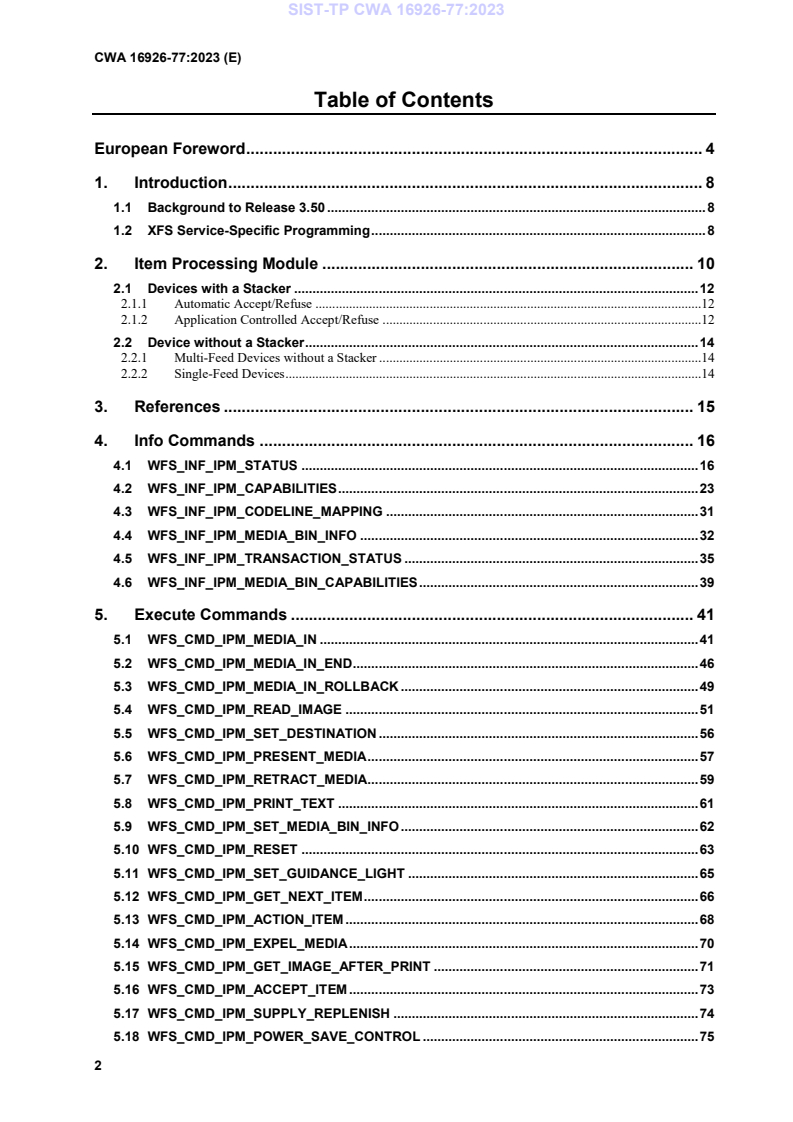
Table of Contents
European Foreword . 4
1. Introduction . 8
1.1 Background to Release 3.50 . 8
1.2 XFS Service-Specific Programming . 8
2. Item Processing Module . 10
2.1 Devices with a Stacker . 12
2.1.1 Automatic Accept/Refuse .12
2.1.2 Application Controlled Accept/Refuse .12
2.2 Device without a Stacker . 14
2.2.1 Multi-Feed Devices without a Stacker .14
2.2.2 Single-Feed Devices .14
3. References . 15
4. Info Commands . 16
4.1 WFS_INF_IPM_STATUS . 16
4.2 WFS_INF_IPM_CAPABILITIES . 23
4.3 WFS_INF_IPM_CODELINE_MAPPING . 31
4.4 WFS_INF_IPM_MEDIA_BIN_INFO . 32
4.5 WFS_INF_IPM_TRANSACTION_STATUS . 35
4.6 WFS_INF_IPM_MEDIA_BIN_CAPABILITIES . 39
5. Execute Commands . 41
5.1 WFS_CMD_IPM_MEDIA_IN . 41
5.2 WFS_CMD_IPM_MEDIA_IN_END . 46
5.3 WFS_CMD_IPM_MEDIA_IN_ROLLBACK . 49
5.4 WFS_CMD_IPM_READ_IMAGE . 51
5.5 WFS_CMD_IPM_SET_DESTINATION . 56
5.6 WFS_CMD_IPM_PRESENT_MEDIA . 57
5.7 WFS_CMD_IPM_RETRACT_MEDIA . 59
5.8 WFS_CMD_IPM_PRINT_TEXT . 61
5.9 WFS_CMD_IPM_SET_MEDIA_BIN_INFO . 62
5.10 WFS_CMD_IPM_RESET . 63
5.11 WFS_CMD_IPM_SET_GUIDANCE_LIGHT . 65
5.12 WFS_CMD_IPM_GET_NEXT_ITEM . 66
5.13 WFS_CMD_IPM_ACTION_ITEM . 68
5.14 WFS_CMD_IPM_EXPEL_MEDIA . 70
5.15 WFS_CMD_IPM_GET_IMAGE_AFTER_PRINT . 71
5.16 WFS_CMD_IPM_ACCEPT_ITEM . 73
5.17 WFS_CMD_IPM_SUPPLY_REPLENISH . 74
5.18 WFS_CMD_IPM_POWER_SAVE_CONTROL . 75
5.19 WFS_CMD_IPM_SET_MODE . 76
5.20 WFS_CMD_IPM_SYNCHRONIZE_COMMAND . 77
6. Events . 78
6.1 WFS_EXEE_IPM_NOMEDIA . 78
6.2 WFS_EXEE_IPM_MEDIAINSERTED . 79
6.3 WFS_USRE_IPM_MEDIABINTHRESHOLD . 80
6.4 WFS_SRVE_IPM_MEDIABININFOCHANGED . 81
6.5 WFS_EXEE_IPM_MEDIABINERROR . 82
6.6 WFS_SRVE_IPM_MEDIATAKEN . 83
6.7 WFS_USRE_IPM_TONERTHRESHOLD . 84
6.8 WFS_USRE_IPM_SCANNERTHRESHOLD . 85
6.9 WFS_USRE_IPM_INKTHRESHOLD . 86
6.10 WFS_SRVE_IPM_MEDIADETECTED . 87
6.11 WFS_EXEE_IPM_MEDIAPRESENTED . 88
6.12 WFS_EXEE_IPM_MEDIAREFUSED . 89
6.13 WFS_EXEE_IPM_MEDIADATA . 91
6.14 WFS_USRE_IPM_MICRTHRESHOLD . 94
6.15 WFS_EXEE_IPM_MEDIAREJECTED . 95
6.16 WFS_SRVE_IPM_DEVICEPOSITION . 96
6.17 WFS_SRVE_IPM_POWER_SAVE_CHANGE . 97
6.18 WFS_SRVE_IPM_SHUTTERSTATUSCHANGED . 98
7. Command and Event Flows . 99
7.1 Devices with Stacker . 99
7.1.1 Bunch Media Processing (OK flow) .99
7.1.2 Bunch Media Processing (Some Media Items Returned) .100
7.1.3 Bunch Media Processing with Errors .101
7.1.4 Bunch media processing with Rollback .102
7.1.5 Bunch media processing with Retract .103
7.1.6 Bunch Media Processing - Application Refuse Decision (All OK flow) .103
7.1.7 Bunch Media Processing - Application Refuse Decision (Some items refused) .104
7.2 Devices without Stacker . 106
7.2.1 Bunch Media Processing (OK flow) .106
7.2.2 Bunch Media Processing (Some Media Items Returned) .107
7.2.3 Bunch Media Processing with Errors .108
8. ATM Mixed Media Transaction Flow – Application Guidelines. 110
9. C-Header File . 111
European Foreword
This CEN Workshop Agreement has been developed in accordance with the CEN-CENELEC Guide 29
“CEN/CENELEC Workshop Agreements – The way to rapid consensus” and with the relevant provisions of
CEN/CENELEC Internal Regulations - Part 2. It was approved by a Workshop of representatives of interested
parties on 2022-11-08, the constitution of which was supported by CEN following several public calls for
participation, the first of which was made on 1998-06-24. However, this CEN Workshop Agreement does not
necessarily include all relevant stakeholders.
The final text of this CEN Workshop Agreement was provided to CEN for publication on 2022-11-18.
The following organizations and individuals developed and approved this CEN Workshop Agreement:
• AURIGA SPA
• CIMA SPA
• DIEBOLD NIXDORF SYSTEMS GMBH
• FIS BANKING SOLUTIONS UK LTD (OTS)
• FUJITSU TECHNOLOGY SOLUTIONS
• GLORY LTD
• GRG BANKING EQUIPMENT HK CO LTD
• HITACHI CHANNEL SOLUTIONS CORP
• HYOSUNG TNS INC
• JIANGSU GUOGUANG ELECTRONIC INFORMATION TECHNOLOGY
• KAL
• KEBA HANDOVER AUTOMATION GMBH
• NCR FSG
• NEXUS SOFTWARE
• OBERTHUR CASH PROTECTION
• OKI ELECTRIC INDUSTRY SHENZHEN
• SALZBURGER BANKEN SOFTWARE
• SECURE INNOVATION
• SIGMA SPA
It is possible that some elements of this CEN/CWA may be subject to patent rights. The CEN-CENELEC policy on
patent rights is set out in CEN-CENELEC Guide 8 “Guidelines for Implementation of the Common IPR Policy on
Patents (and other statutory intellectual property rights based on inventions)”. CEN shall not be held responsible for
identifying any or all such patent rights.
The Workshop participants have made every effort to ensure the reliability and accuracy of the technical and non-
technical content of CWA 16926-18, but this does not guarantee, either explicitly or implicitly, its correctness.
Users of CWA 16926-18 should be aware that neither the Workshop participants, nor CEN can be held liable for
damages or losses of any kind whatsoever which may arise from its application. Users of CWA 16926-18 do so on
their own responsibility and at their own risk.
The CWA is published as a multi-part document, consisting of:
Part 1: Application Programming Interface (API) - Service Provider Interface (SPI) - Programmer's Reference
Part 2: Service Classes Definition - Programmer's Reference
Part 3: Printer and Scanning Device Class Interface - Programmer's Reference
Part 4: Identification Card Device Class Interface - Programmer's Reference
Part 5: Cash Dispenser Device Class Interface - Programmer's Reference
Part 6: PIN Keypad Device Class Interface - Programmer's Reference
Part 7: Check Reader/Scanner Device Class Interface - Programmer's Reference
Part 8: Depository Device Class Interface - Programmer's Reference
Part 9: Text Terminal Unit Device Class Interface - Programmer's Reference
Part 10: Sensors and Indicators Unit Device Class Interface - Programmer's Reference
Part 11: Vendor Dependent Mode Device Class Interface - Programmer's Reference
Part 12: Camera Device Class Interface - Programmer's Reference
Part 13: Alarm Device Class Interface - Programmer's Reference
Part 14: Card Embossing Unit Device Class Interface - Programmer's Reference
Part 15: Cash-In Module Device Class Interface - Programmer's Reference
Part 16: Card Dispenser Device Class Interface - Programmer's Reference
Part 17: Barcode Reader Device Class Interface - Programmer's Reference
Part 18: Item Processing Module Device Class Interface - Programmer's Reference
Part 19: Biometrics Device Class Interface - Programmer's Reference
Parts 20 - 28: Reserved for future use.
Parts 29 through 47 constitute an optional addendum to this CWA. They define the integration between the SNMP
standard and the set of status and statistical information exported by the Service Providers.
Part 29: XFS MIB Architecture and SNMP Extensions - Programmer’s Reference
Part 30: XFS MIB Device Specific Definitions - Printer Device Class
Part 31: XFS MIB Device Specific Definitions - Identification Card Device Class
Part 32: XFS MIB Device Specific Definitions - Cash Dispenser Device Class
Part 33: XFS MIB Device Specific Definitions - PIN Keypad Device Class
Part 34: XFS MIB Device Specific Definitions - Check Reader/Scanner Device Class
Part 35: XFS MIB Device Specific Definitions - Depository Device Class
Part 36: XFS MIB Device Specific Definitions - Text Terminal Unit Device Class
Part 37: XFS MIB Device Specific Definitions - Sensors and Indicators Unit Device Class
Part 38: XFS MIB Device Specific Definitions - Camera Device Class
Part 39: XFS MIB Device Specific Definitions - Alarm Device Class
Part 40: XFS MIB Device Specific Definitions - Card Embossing Unit Class
Part 41: XFS MIB Device Specific Definitions - Cash-In Module Device Class
Part 42: Reserved for future use.
Part 43: XFS MIB Device Specific Definitions - Vendor Dependent Mode Device Class
Part 44: XFS MIB Application Management
Part 45: XFS MIB Device Specific Definitions - Card Dispenser Device Class
Part 46: XFS MIB Device Specific Definitions - Barcode Reader Device Class
Part 47: XFS MIB Device Specific Definitions - Item Processing Module Device Class
Part 48: XFS MIB Device Specific Definitions - Biometrics Device Class
Parts 49 - 60 are reserved for future use.
Part 61: Application Programming Interface (API) - Migration from Version 3.40 (CWA 16296:2020) to Version
3.50 (this CWA) - Service Provider Interface (SPI) - Programmer's Reference
Part 62: Printer and Scanning Device Class Interface - Migration from Version 3.40 (CWA 16296:2020) to Version
3.50 (this CWA) - Programmer's Reference
Part 63: Identification Card Device Class Interface - Migration from Version 3.40 (CWA 16296:2020) to Version
3.50 (this CWA) - Programmer's Reference
Part 64: Cash Dispenser Device Class Interface - Migration from Version 3.40 (CWA 16296:2020) to Version 3.50
(this CWA) - Programmer's Reference
Part 65: PIN Keypad Device Class Interface - Migration from Version 3.40 (CWA 16296:2020) to Version 3.50
(this CWA) - Programmer's Reference
Part 66: Check Reader/Scanner Device Class Interface - Migration from Version 3.40 (CWA 16296:2020) to
Version 3.50 (this CWA) - Programmer's Reference
Part 67: Depository Device Class Interface - Migration from Version 3.40 (CWA 16296:2020) to Version 3.50 (this
CWA) - Programmer's Reference
Part 68: Text Terminal Unit Device Class Interface - Migration from Version 3.40 (CWA 16296:2020) to Version
3.50 (this CWA) - Programmer's Reference
Part 69: Sensors and Indicators Unit Device Class Interface - Migration from Version 3.40 (CWA 16296:2020) to
Version 3.50 (this CWA) - Programmer's Reference
Part 70: Vendor Dependent Mode Device Class Interface - Migration from Version 3.40 (CWA 16296:2020) to
Version 3.50 (this CWA) - Programmer's Reference
Part 71: Camera Device Class Interface - Migration from Version 3.40 (CWA 16296:2020) to Version 3.50 (this
CWA) - Programmer's Reference
Part 72: Alarm Device Class Interface - Migration from Version 3.40 (CWA 16296:2020) to Version 3.50 (this
CWA) - Programmer's Reference
Part 73: Card Embossing Unit Device Class Interface - Migration from Version 3.40 (CWA 16296:2020) to
Version 3.50 (this CWA) - Programmer's Reference
Part 74: Cash-In Module Device Class Interface - Migration from Version 3.40 (CWA 16296:2020) to Version 3.50
(this CWA) - Programmer's Reference
Part 75: Card Dispenser Device Class Interface - Migration from Version 3.40 (CWA 16296:2020) to Version 3.50
(this CWA) - Programmer's Reference
Part 76: Barcode Reader Device Class Interface - Migration from Version 3.40 (CWA 16296:2020) to Version 3.50
(this CWA) - Programmer's Reference
Part 77: Item Processing Module Device Class Interface - Migration from Version 3.40 (CWA 16296:2020) to
Version 3.50 (this CWA) - Programmer's Reference
Part 78: Biometric Device Class Interface - Migration from Version 3.40 (CWA 16296:2020) to Version 3.50 (this
CWA) - Programmer's Reference
In addition to these Programmer's Reference specifications, the reader of this CWA is also referred to a
complementary document, called Release Notes. The Release Notes contain clarifications and explanations on the
CWA specifications, which are not requiring functional changes. The current version of the Release Notes is
available online from: https://www.cencenelec.eu/areas-of-work/cen-sectors/digital-society-cen/cwa-download-
area/.
The information in this document represents the Workshop's current views on the issues discussed as of the date of
publication. It is provided for informational purposes only and is subject to change without notice. CEN makes no
warranty, express or implied, with respect to this document.
Revision History:
3.10 November 29, 2007 Initial Release.
3.20 March 2, 2011 For a description of changes from version 3.10 to version
3.20 see the IPM 3.20 Migration document.
3.30 March 19, 2015 For a description of changes from version 3.20 to version
3.30 see the IPM 3.30 Migration document.
3.40 December 06, 2019 For a description of changes from version 3.30 to version
3.40 see the IPM 3.40 Migration document.
3.50 November 18, 2022 For a description of changes from version 3.40 to version
3.50 see the IPM 3.50 Migration document.
1. Introduction
1.1 Background to Release 3.50
The CEN/XFS Workshop aims to promote a clear and unambiguous specification defining a multi-vendor software
interface to financial peripheral devices. The XFS (eXtensions for Financial Services) specifications are developed
within the CEN (European Committee for Standardization/Information Society Standardization System) Workshop
environment. CEN Workshops aim to arrive at a European consensus on an issue that can be published as a CEN
Workshop Agreement (CWA).
The CEN/XFS Workshop encourages the participation of both banks and vendors in the deliberations required to
create an industry standard. The CEN/XFS Workshop achieves its goals by focused sub-groups working
electronically and meeting quarterly.
Release 3.50 of the XFS specification is based on a C API and is delivered with the continued promise for the
protection of technical investment for existing applications. This release of the specification extends the
functionality and capabilities of the existing devices covered by the specification:
• Addition of E2E security
• PIN Password Entry
1.2 XFS Service-Specific Programming
The service classes are defined by their service-specific commands and the associated data structures, error codes,
messages, etc. These commands are used to request functions that are specific to one or more classes of Service
Providers, but not all of them, and therefore are not included in the common API for basic or administration
functions.
When a service-specific command is common among two or more classes of Service Providers, the syntax of the
command is as similar as possible across all services, since a major objective of XFS is to standardize function
codes and structures for the broadest variety of services. For example, using the WFSExecute function, the
commands to read data from various services are as similar as possible to each other in their syntax and data
structures.
In general, the specific command set for a service class is defined as a superset of the specific capabilities likely to
be provided by the developers of the services of that class; thus any particular device will normally support only a
subset of the defined command set.
There are three cases in which a Service Provider may receive a service-specific command that it does not support:
The requested capability is defined for the class of Service Providers by the XFS specification, the particular vendor
implementation of that service does not support it, and the unsupported capability is not considered to be
fundamental to the service. In this case, the Service Provider returns a successful completion, but does no operation.
An example would be a request from an application to turn on a control indicator on a passbook printer; the Service
Provider recognizes the command, but since the passbook printer it is managing does not include that indicator, the
Service Provider does no operation and returns a successful completion to the application.
The requested capability is defined for the class of Service Providers by the XFS specification, the particular vendor
implementation of that service does not support it, and the unsupported capability is considered to be fundamental
to the service. In this case, a WFS_ERR_UNSUPP_COMMAND error for Execute commands or
WFS_ERR_UNSUPP_CATEGORY error for Info commands is returned to the calling application. An example
would be a request from an application to a cash dispenser to retract items where the dispenser hardware does not
have that capability; the Service Provider recognizes the command but, since the cash dispenser it is managing is
unable to fulfil the request, returns this error.
The requested capability is not defined for the class of Service Providers by the XFS specification. In this case, a
WFS_ERR_INVALID_COMMAND error for Execute commands or WFS_ERR_INVALID_CATEGORY error
for Info commands is returned to the calling application.
This design allows implementation of applications that can be used with a range of services that provide differing
subsets of the functionalities that are defined for their service class. Applications may use the WFSGetInfo and
WFSAsyncGetInfo commands to inquire about the capabilities of the service they are about to use, and modify
their behavior accordingly, or they may use functions and then deal with error returns to make decisions as to how
to use the service.
2. Item Processing Module
This specification describes the XFS service class for Item Processing Modules (IPM). The specification of this
service class includes definitions of the service-specific commands that can be issued, using the
WFSAsyncExecute, WFSExecute, WFSGetInfo and WFSAsyncGetInfo functions.
This service class is currently defined only for self service devices.
In the U.S., checks are always encoded in magnetic ink for reading by Magnetic Ink Character Recognition
(MICR), and a single font is always used. In Europe some countries use MICR and some use Optical Character
Recognition (OCR) character sets, with different fonts, for their checks.
Item Processing Modules accept one or more media items (Checks, Giros, etc).) and process these items according
to application requirements. The IPM class supports devices that can handle a single item as well as those devices
that can handle bunches of items. The following are the three principleprincipal device types:
• Single Item: can accept and process a single item at a time.
• Multi-Item Feed with no stacker (known as an escrow in some environments): can accept a bunch of
media from the customer but each item has to be processed fully (i.e. deposited in a bin or returned) before
the next item can be processed.
• Multi-Item Feed with a stacker: can accept a bunch of media from the customer and all items can be
processed together.
The IPM class provides applications with an interface to control the following functions (depending on the
capabilities of the specific underlying device):
• Capture an image of the front of an item in multiple formats and bit depths.
• Capture an image of the back of an item in multiple formats and bit depths.
• Read the code line of an item using MICR reader.
• Read the code line of an item using OCR.
• Endorse (print text) on an item.
• Stamp an item.
• Return an item to the customer.
• Deposit an item in a bin.
• Retract items left by the customer.
The IPM device class uses the concept of a Media-In transaction to track and control a customer’s interaction with
the device. A Media-In transaction consists of one or more WFS_CMD_IPM_MEDIA_IN commands. The
transaction is initiated by the first WFS_CMD_IPM_MEDIA_IN command and remains active until the transaction
is either confirmed through WFS_CMD_IPM_MEDIA_IN_END, or terminated by
WFS_CMD_IPM_MEDIA_IN_ROLLBACK, WFS_CMD_IPM_RETRACT_MEDIA or
WFS_CMD_IPM_RESET. While a transaction is active the WFS_INF_IPM_TRANSACTION_STATUS
command reports the status of the current transaction. When a transaction is not active the
WFS_INF_IPM_TRANSACTION_STATUS command reports the status of the last transaction as well as some
current status values.
There are primarily two types of devices supported by the IPM, those devices with a stacker and those without.
In this the specification the terms “long edge” and “short edge” are used to describe the orientation of a check and
length of its edges. The diagram below illustrates these definitions.
2.1 Devices with a Stacker
On devices with a stacker, the IPM device class supports two mechanisms for deciding if physically acceptable
items should be accepted onto the stacker or refused:
• The device/Service Provider automatically makes the accept/refuse decision.
• The application controls the accept/refuse decision.
2.1.1 Automatic Accept/Refuse
In summary, the following process is followed (the exact order will depend on application requirements):
1. The application initiates the transaction via the WFS_CMD_IPM_MEDIA_IN command. This command
accepts a bunch of media items. The images and code line for every media item accepted is sent to the
application before the command completes.
2. The application then asks the customer if they have any more items to process.
3. If the customer has more items to deposit then the WFS_CMD_IPM_MEDIA_IN command is called one
or more times to add more items to the stacker.
4. Once the customer has inserted all their bunches of items and they have been added to the stacker the
application can process each item and predefine what should happen to each media item during the
WFS_CMD_IPM_MEDIA_IN_END command, e.g.:
a. Define if the item should be stamped and what should be printed on the item (using
WFS_CMD_IPM_PRINT_TEXT), set the destination bin (using
WFS_CMD_IPM_SET_DESTINATION), and request the item is rescanned after printing (using
WFS_CMD_IPM_GET_IMAGE_AFTER_PRINT), or
b. Define that the item should be returned to the customer (using
WFS_CMD_IPM_SET_DESTINATION).
5. When all items have been processed the application calls WFS_CMD_IPM_MEDIA_IN_END to
complete the transaction and carry out the predefined actions, e.g. print and deposit some items while
returning others.
Note: Before the WFS_CMD_IPM_MEDIA_IN_END command is called, the customer can cancel the transaction
at any time and all items are returned to the customer by the application calling WFS_CMD_IPM_ROLLBACK.
2.1.2 Application Controlled Accept/Refuse
In summary, the following process is followed (the exact order will depend on application requirements):
1. The application uses the WFS_CMD_IPM_MEDIA_IN command to accept a bunch of media items (the
first use of this command initiates the transaction). The application indicates that it wants to make the
accept/refuse decision for each item via an input parameter, and as a result only one item is processed and
the code line and images are only produced for a single item.
2. The application processes the item and decides if it should be accepted or refused using the
WFS_CMD_IPM_ACCEPT_ITEM command.
3. The application calls WFS_CMD_IPM_GET_NEXT_ITEM to read the next item. If an item is read then
the flow continues at step 2. When there are no items left to process the flow continues with the next step.
4. The application can return the refused items to the customer with WFS_CMD_IPM_PRESENT_MEDIA.
5. The application then asks the customer if they have any more items to process or wish to re-insert the
refused items after correcting the issue causing the refusal.
6. If the customer has more items to deposit then flow continues at step 1, otherwise the flow continues at the
next step.
7. Once the customer has inserted all their bunches of items and they have been added to the stacker the
application can process each item and predefine what should happen to each media item during the
WFS_CMD_IPM_MEDIA_IN_END command, e.g.:
a. Define if the item should be stamped and what should be printed on the item (using
WFS_CMD_IPM_PRINT_TEXT), set the destination bin (using
WFS_CMD_IPM_SET_DESTINATION), and request the item is rescanned after printing (using
WFS_CMD_IPM_GET_IMAGE_AFTER_PRINT), or
b. Define that the item should be returned to the customer (using
WFS_CMD_IPM_SET_DESTINATION).
8. When all items have been processed the application calls WFS_CMD_IPM_MEDIA_IN_END to
complete the transaction and carry out the predefined actions, e.g. print and deposit some items while
returning others.
Note: Before the WFS_CMD_IPM_MEDIA_IN_END command is called, the customer can cancel the transaction
at any time and all items are returned to the customer by the application calling WFS_CMD_IPM_ROLLBACK.
2.2 Device without a Stacker
Devices without a stacker fall into two categories those with a multi-item feed unit and those without. Both of these
types of devices can be handled by the same application flow, however they are both documented below for clarity.
2.2.1 Multi-Feed Devices without a Stacker
In summary, the following process is followed (the exact order will depend on application requirements):
1. The application uses the WFS_CMD_IPM_MEDIA_IN command to accept a bunch of media items (the
first use of this command initiates the transaction). However as there is no stacker only one item is
processed and the code line and images are only produced for a single item.
2. The application processes the item and decides what should be done to the item, e.g.:
a. Define if the item should be stamped and what should be printed on the item (using
WFS_CMD_IPM_PRINT_TEXT), set the destination bin (using
WFS_CMD_IPM_SET_DESTINATION), and request the item is rescanned after printing (using
WFS_CMD_IPM_GET_IMAGE_AFTER_PRINT), or
b. Define that the item should be returned to the customer (using
WFS_CMD_IPM_SET_DESTINATION).
3. The application calls WFS_CMD_IPM_ACTION_ITEM to have the predefined actions executed.
4. The application calls WFS_CMD_IPM_GET_NEXT_ITEM to read the next item. If an item is read then
the flow continues at step 2. When there are not items left to process the flow continues with the next step.
5. The application then asks the customer if they have any more items to process.
6. If the customer has more items to deposit then flow continues at step 1.
7. When the customer is finished the application calls WFS_CMD_IPM_MEDIA_IN_END to terminate the
transaction.
2.2.2 Single-Feed Devices
In summary, the following process is followed:
1. The application initiates the transaction via the WFS_CMD_IPM_MEDIA_IN command. This command
accepts a single item and produces the image and code line.
2. The application processes the item and decides what should be done to the item, e.g.:
a. Define if the item should be stamped and what should be printed on the item (using
WFS_CMD_IPM_PRINT_TEXT), set the destination bin (using
WFS_CMD_IPM_SET_DESTINATION), and request the item is rescanned after printing (using
WFS_CMD_IPM_GET_IMAGE_AFTER_PRINT), or
b. Define that the item should be returned to the customer (using
WFS_CMD_IPM_SET_DESTINATION).
3. The application calls WFS_CMD_IPM_ACTION_ITEM to have the predefined actions executed.
4. The application optionally calls WFS_CMD_IPM_GET_NEXT_ITEM to have a single flow for devices
with multi-feed and without. The flow continues with the next step.
5. The application then asks the customer if they have any more items to process.
6. If the customer has more items to deposit then flow continues at step 1.
7. When the customer is finished the application calls WFS_CMD_IPM_MEDIA_IN_END to terminate the
transaction.
3. References
1. XFS Application Programming Interface (API)/Service Provider Interface (SPI), Programmer’s Reference
Revision 3.4050
2. Extensions for Financial Services (XFS) interface specification, Release 3.4050, Part 15: Cash-In Module,
Device Class Interface, Programmer's Reference
4. Info Commands
4.1 WFS_INF_IPM_STATUS
Description This command is used to request status information for the device.
Input Param None.
Output Param LPWFSIPMSTATUS lpStatus;
typedef struct _wfs_ipm_status
{
WORD fwDevice;
WORD wAcceptor;
WORD wMedia;
WORD wToner;
WORD wInk;
WORD wFrontImageScanner;
WORD wBackImageScanner;
WORD wMICRReader;
WORD wStacker;
WORD wReBuncher;
WORD wMediaFeeder;
LPWFSIPMPOS *lppPositions;
DWORD dwGuidLights[WFS_IPM_GUIDLIGHTS_SIZE];
LPSTR lpszExtra;
WORD wDevicePosition;
USHORT usPowerSaveRecoveryTime;
WORD wMixedMode;
WORD wAntiFraudModule;
} WFSIPMSTATUS, *LPWFSIPMSTATUS;
fwDevice
Specifies the state of the IPM. However, an fwDevice status of WFS_IPM_DEVONLINE does
not necessarily imply that accepting can take place: the value of wAcceptor field must be taken
into account. The state of the device will be one of the following values:
Value Meaning
WFS_IPM_DEVONLINE The device is online (i.e. powered on and
operable).
WFS_IPM_DEVOFFLINE The device is offline (e.g. the operator has
taken the device offline by turning a switch).
WFS_IPM_DEVPOWEROFF The device is powered off or physically not
connected.
WFS_IPM_DEVNODEVICE There is no device intended to be there; e.g.
this type of self service machine does not
contain such a device or it is internally not
configured.
WFS_IPM_DEVHWERROR The device is inoperable due to a hardware
error.
WFS_IPM_DEVUSERERROR The device is present but a person is
preventing proper device operation.
WFS_IPM_DEVBUSY The device is busy and unable to process an
execute command at this time.
WFS_IPM_DEVFRAUDATTEMPT The device is present but is inoperable
because it has detected a fraud attempt.
WFS_IPM_DEVPOTENTIALFRAUD The device has detected a potential fraud
attempt and is capable of remaining in
service. In this case the application should
make the decision as to whether to take the
device offline.
wAcceptor
Supplies the state of the overall acceptor media bins as one of the following values:
Value Meaning
WFS_IPM_ACCBINOK All media bins present are in a good state.
WFS_IPM_ACCBINSTATE One or more of the media bins is in a high,
full or inoperative condition. Items can still
be accepted into at least one of the media
bins. The status of the bins can be obtained
through the
WFS_INF_IPM_MEDIA_BIN_INFO
command.
WFS_IPM_ACCBINSTOP Due to a media bin problem accepting is
impossible. No items can be accepted
because all of the media bins are in a full or
in an inoperative condition.
WFS_IPM_ACCBINUNKNOWN Due to a hardware error or other condition,
the state of the media bins cannot be
determined.
wMedia
Specifies the state of the media as one of the following values:
Value Meaning
WFS_IPM_MEDIAPRESENT Media is present in the device.
WFS_IPM_MEDIANOTPRESENT Media is not present in the device.
WFS_IPM_MEDIAJAMMED Media is jammed in the device.
WFS_IPM_MEDIANOTSUPP The capability to report the state of the
media is not supported by the device.
WFS_IPM_MEDIAUNKNOWN The state of the media cannot be determined
with the device in its current state.
WFS_IPM_MEDIAPOSITION Media is at one or more of the input, output
and refused positions.
wToner
Specifies the state of the toner or ink supply or the state of the ribbon of the endorser as one of the
following values:
Value Meaning
WFS_IPM_TONERFULL The toner or ink supply is full or the ribbon
is OK.
WFS_IPM_TONERLOW The toner or ink supply is low or the print
contrast with a ribbon is weak.
WFS_IPM_TONEROUT The toner or ink supply is empty or the print
contrast with a ribbon is not sufficient any
more.
WFS_IPM_TONERNOTSUPP The physical device does not support
endorsing or the capability to report the
status of the toner/ink is not supported by the
device.
WFS_IPM_TONERUNKNOWN Status of toner or ink supply or the ribbon
cannot be determined with the device in its
current state.
wInk
Specifies the status of the stamping ink in the device as one of the following values:
Value Meaning
WFS_IPM_INKFULL Ink supply in the device is full.
WFS_IPM_INKLOW Ink supply in the device is low.
WFS_IPM_INKOUT Ink supply in the device is empty.
WFS_IPM_INKNOTSUPP The physical device does not support
stamping or the capability to report the status
of the stamp ink supply is not supported by
the device.
WFS_IPM_INKUNKNOWN Status of the stamping ink supply cannot be
determined with the device in its current
state.
wFrontImageScanner
Specifies the status of the image scanner that captures images of the front of the media items. This
value can be one of the following values:
Value Meaning
WFS_IPM_SCANNEROK The front scanner is OK.
WFS_IPM_SCANNERFADING The front scanner performance is degraded.
WFS_IPM_SCANNERINOP The front scanner is inoperative.
WFS_IPM_SCANNERNOTSUPP The physical device has no front scanner or
the capability to report the status of the front
scanner is not supported by the device.
WFS_IPM_SCANNERUNKNOWN Status of the front scanner cannot be
determined with the device in its current
state.
wBackImageScanner
Specifies the status of the image scanner that captures images of the back of the media items. This
value can be one of the following values:
Value Meaning
WFS_IPM_SCANNEROK The back scanner is OK.
WFS_IPM_SCANNERFADING The back scanner performance is degraded.
WFS_IPM_SCANNERINOP The back scanner is inoperative.
WFS_IPM_SCANNERNOTSUPP The physical device has no back scanner or
the capability to report the status of the back
scanner is not supported by the device.
WFS_IPM_SCANNERUNKNOWN Status of the back scanner cannot be
determined with the device in its current
state.
wMICRReader
Specifies the status of the MICR code line reader as one of the following values:
Value Meaning
WFS_IPM_MICROK The MICR code line reader is OK.
WFS_IPM_MICRFADING The MICR code line reader performance is
degraded.
WFS_IPM_MICRINOP The MICR code line reader is inoperative.
WFS_IPM_MICRNOTSUPP The physical device has no MICR code line
reader or the capability to report the status of
the MICR code line
...