

IEC 62541-24:2026
(Main)OPC unified architecture - Part 24: Scheduler
General Information
- Abstract
IEC 62541-24:2026 specifies an OPC UA information model to expose information, at what dates and times specific actions are executed by the OPC UA Server. Those schedules can optionally also be manipulated via the information model.
The schedule defines on which dates they are active, and can also reference global calendars representing specific dates, for example public holidays. In addition, the schedule defines times and actions that will be executed at that time. The model defines writing Variables and calling Methods but can be extended to other actions as well.
The NamespaceUri for all NodeIds defined in this document is defined in Annex A.
- Status
- Published
- Publication Date
- 07-Jan-2026
- Technical Committee
- SC 65E - Devices and integration in enterprise systems
- Drafting Committee
- WG 8 - TC 65/SC 65E/WG 8
- Current Stage
- PPUB - Publication issued
- Start Date
- 08-Jan-2026
- Completion Date
- 10-Dec-2025
Buy Documents

IEC 62541-24:2026 - OPC unified architecture - Part 24: Scheduler Released:1/8/2026
IEC 62541-24:2026 - Architecture unifiée OPC - Partie 24: Ordonnanceur Released:1/8/2026

IEC 62541-24:2026 - OPC unified architecture - Part 24: Scheduler Released:1/8/2026
Overview
IEC 62541-24:2026 is an international standard published by the International Electrotechnical Commission (IEC) that defines the Scheduler component of the OPC Unified Architecture (OPC UA). This part 24 of the OPC UA series specifies a comprehensive information model enabling OPC UA Servers to expose, manage, and manipulate schedules for executing specific actions at designated dates and times. The standard facilitates automation by allowing precise control over when certain operations occur within an OPC UA environment.
The standard introduces a scheduler model that supports defining active dates for actions, including referencing global calendars such as public holidays. This scheduling framework ensures that time-based automation tasks can respect organizational or regional constraints, improving operational efficiency and compliance.
Key Topics
- Schedule Information Model: Defines how schedules are represented within an OPC UA Server, including dates, times, and associated actions.
- Global Calendars: Supports referencing external calendars, allowing schedules to adapt to holidays or special events automatically.
- Scheduling Actions: Covers various types of actions - writing Variables, invoking Methods, and extensibility for other custom actions.
- Use Cases: Detailed scenarios such as scheduling actions on specific weekdays, special dates, recurring intervals, and exceptions.
- OPC UA ObjectTypes: Includes CalendarType and ScheduleType with definitions for methods to add or remove date elements and exception schedules.
- DataTypes: SpecialEventType, CalendarEntryType, DateType, and other related types that provide structured data formats for accurate scheduling.
- Profiles and Conformance Units: Ensures interoperability by specifying compliance requirements for different scheduling functionalities.
- Namespace Management: Clarifies NamespaceUris for NodeIds and best practices for handling OPC UA namespaces in scheduling contexts.
Applications
IEC 62541-24:2026 is highly relevant for industries and applications requiring precise timed automation within OPC UA-enabled systems:
- Industrial Automation: Planning and executing maintenance cycles, batch processes, or quality control actions based on time schedules.
- Smart Manufacturing: Automating operations synchronized with work shifts, holidays, or exceptional events using calendaring capabilities.
- Building Automation: Managing lighting, HVAC, and security systems based on daily or seasonal schedules aligned with occupancy and local regulations.
- Energy Management: Scheduling energy consumption or production tasks around tariffs, peak periods, or regulatory restrictions.
- Utility Services: Coordinating actions like meter reading, system checks, or updates respecting calendars that include public holidays and exceptions.
- IoT Systems: Enabling device behaviors to align with specific time-related criteria, improving responsiveness and energy efficiency.
This standard offers a flexible framework that ensures time-based automation can be securely integrated, queried, and manipulated within OPC UA-based environments, enhancing reliability and maintainability.
Related Standards
- IEC 62541 Series (OPC UA): The suite of standards defining the OPC Unified Architecture framework for secure and interoperable industrial communication.
- IEC 62541-1: OPC UA Part 1 - Overview and Concepts: Provides the foundational principles of OPC UA, complementing the Scheduler model.
- IEC 62541-5: OPC UA Part 5 - Information Model: Details the general information modeling framework used by scheduling and other OPC UA specifications.
- IEC 62541-9: OPC UA Part 9 - Alarms and Conditions: Relevant for integrating time-based conditions and alerting with scheduled events.
- IEC 62541-11: OPC UA Part 11 - Historical Access: For systems requiring audit trails or reviewing historical schedules and actions.
- ISO 8601: International standard for date and time formats, which is harmonized with the scheduler’s date/time representations.
- Industry-Specific Scheduling Standards: May be used alongside IEC 62541-24 for domain-specific scheduling requirements.
By adhering to IEC 62541-24:2026, organizations can leverage a standardized and extensible scheduler that integrates seamlessly into OPC UA infrastructures, supporting robust time-based automation for diverse electric, electronic, and industrial processes.
Buy Documents
IEC 62541-24:2026 - OPC unified architecture - Part 24: Scheduler Released:1/8/2026
IEC 62541-24:2026 - Architecture unifiée OPC - Partie 24: Ordonnanceur Released:1/8/2026
IEC 62541-24:2026 - OPC unified architecture - Part 24: Scheduler Released:1/8/2026
Get Certified
Connect with accredited certification bodies for this standard

DVS-ZERT GmbH
German welding certification society.
CARES (UK Certification Authority for Reinforcing Steels)
UK certification for reinforcing steels and construction.
EWF/IIW (European/International Welding Federation)
International welding personnel certification.
Sponsored listings
Frequently Asked Questions
IEC 62541-24:2026 is a standard published by the International Electrotechnical Commission (IEC). Its full title is "OPC unified architecture - Part 24: Scheduler". This standard covers: IEC 62541-24:2026 specifies an OPC UA information model to expose information, at what dates and times specific actions are executed by the OPC UA Server. Those schedules can optionally also be manipulated via the information model. The schedule defines on which dates they are active, and can also reference global calendars representing specific dates, for example public holidays. In addition, the schedule defines times and actions that will be executed at that time. The model defines writing Variables and calling Methods but can be extended to other actions as well. The NamespaceUri for all NodeIds defined in this document is defined in Annex A.
IEC 62541-24:2026 specifies an OPC UA information model to expose information, at what dates and times specific actions are executed by the OPC UA Server. Those schedules can optionally also be manipulated via the information model. The schedule defines on which dates they are active, and can also reference global calendars representing specific dates, for example public holidays. In addition, the schedule defines times and actions that will be executed at that time. The model defines writing Variables and calling Methods but can be extended to other actions as well. The NamespaceUri for all NodeIds defined in this document is defined in Annex A.
IEC 62541-24:2026 is classified under the following ICS (International Classification for Standards) categories: 25.040 - Industrial automation systems. The ICS classification helps identify the subject area and facilitates finding related standards.
IEC 62541-24:2026 is available in PDF format for immediate download after purchase. The document can be added to your cart and obtained through the secure checkout process. Digital delivery ensures instant access to the complete standard document.
Standards Content (Sample)
IEC 62541-24 ®
Edition 1.0 2026-01
INTERNATIONAL
STANDARD
OPC unified architecture -
Part 24: Scheduler
ICS 25.040 ISBN 978-2-8327-0875-0
All rights reserved. Unless otherwise specified, no part of this publication may be reproduced or utilized in any form or
by any means, electronic or mechanical, including photocopying and microfilm, without permission in writing from either
IEC or IEC's member National Committee in the country of the requester. If you have any questions about IEC copyright
or have an enquiry about obtaining additional rights to this publication, please contact the address below or your local
IEC member National Committee for further information.
IEC Secretariat Tel.: +41 22 919 02 11
3, rue de Varembé info@iec.ch
CH-1211 Geneva 20 www.iec.ch
Switzerland
About the IEC
The International Electrotechnical Commission (IEC) is the leading global organization that prepares and publishes
International Standards for all electrical, electronic and related technologies.
About IEC publications
The technical content of IEC publications is kept under constant review by the IEC. Please make sure that you have the
latest edition, a corrigendum or an amendment might have been published.
IEC publications search - IEC Products & Services Portal - products.iec.ch
webstore.iec.ch/advsearchform Discover our powerful search engine and read freely all the
The advanced search enables to find IEC publications by a
publications previews, graphical symbols and the glossary.
variety of criteria (reference number, text, technical With a subscription you will always have access to up to date
committee, …). It also gives information on projects, content tailored to your needs.
replaced and withdrawn publications.
Electropedia - www.electropedia.org
IEC Just Published - webstore.iec.ch/justpublished The world's leading online dictionary on electrotechnology,
Stay up to date on all new IEC publications. Just Published containing more than 22 500 terminological entries in English
details all new publications released. Available online and and French, with equivalent terms in 25 additional languages.
once a month by email. Also known as the International Electrotechnical Vocabulary
(IEV) online.
IEC Customer Service Centre - webstore.iec.ch/csc
If you wish to give us your feedback on this publication or
need further assistance, please contact the Customer
Service Centre: sales@iec.ch.
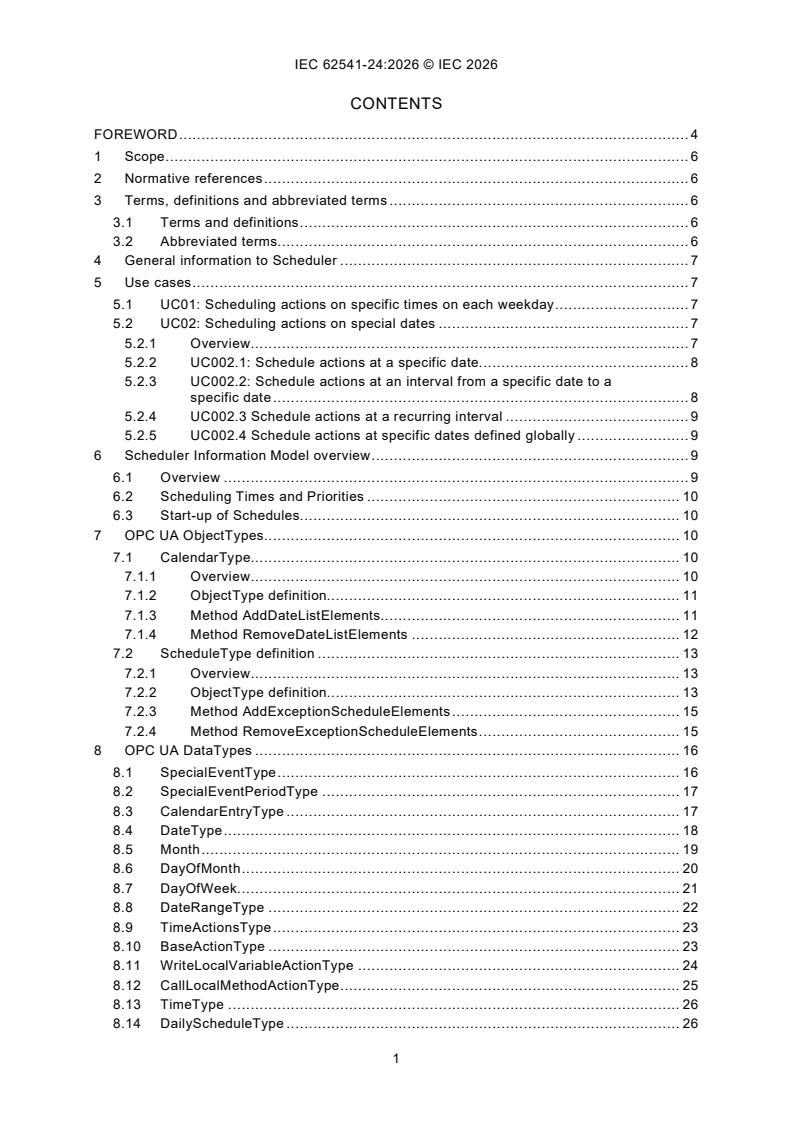
CONTENTS
FOREWORD . 4
1 Scope . 6
2 Normative references . 6
3 Terms, definitions and abbreviated terms . 6
3.1 Terms and definitions . 6
3.2 Abbreviated terms. 6
4 General information to Scheduler . 7
5 Use cases . 7
5.1 UC01: Scheduling actions on specific times on each weekday . 7
5.2 UC02: Scheduling actions on special dates . 7
5.2.1 Overview . 7
5.2.2 UC002.1: Schedule actions at a specific date. 8
5.2.3 UC002.2: Schedule actions at an interval from a specific date to a
specific date . 8
5.2.4 UC002.3 Schedule actions at a recurring interval . 9
5.2.5 UC002.4 Schedule actions at specific dates defined globally . 9
6 Scheduler Information Model overview . 9
6.1 Overview . 9
6.2 Scheduling Times and Priorities . 10
6.3 Start-up of Schedules. 10
7 OPC UA ObjectTypes . 10
7.1 CalendarType. 10
7.1.1 Overview . 10
7.1.2 ObjectType definition. 11
7.1.3 Method AddDateListElements. 11
7.1.4 Method RemoveDateListElements . 12
7.2 ScheduleType definition . 13
7.2.1 Overview . 13
7.2.2 ObjectType definition. 13
7.2.3 Method AddExceptionScheduleElements . 15
7.2.4 Method RemoveExceptionScheduleElements . 15
8 OPC UA DataTypes . 16
8.1 SpecialEventType . 16
8.2 SpecialEventPeriodType . 17
8.3 CalendarEntryType . 17
8.4 DateType . 18
8.5 Month . 19
8.6 DayOfMonth . 20
8.7 DayOfWeek. 21
8.8 DateRangeType . 22
8.9 TimeActionsType . 23
8.10 BaseActionType . 23
8.11 WriteLocalVariableActionType . 24
8.12 CallLocalMethodActionType . 25
8.13 TimeType . 26
8.14 DailyScheduleType . 26
9 Profiles and Conformance Units . 27
10 Namespaces . 27
10.1 Namespace Metadata . 27
10.2 Handling of OPC UA Namespaces . 28
Annex A (normative) Scheduler Namespace and Identifiers . 30
A.1 Namespace and Identifiers for the Scheduler Information Model . 30
A.2 Capability Identifier . 30
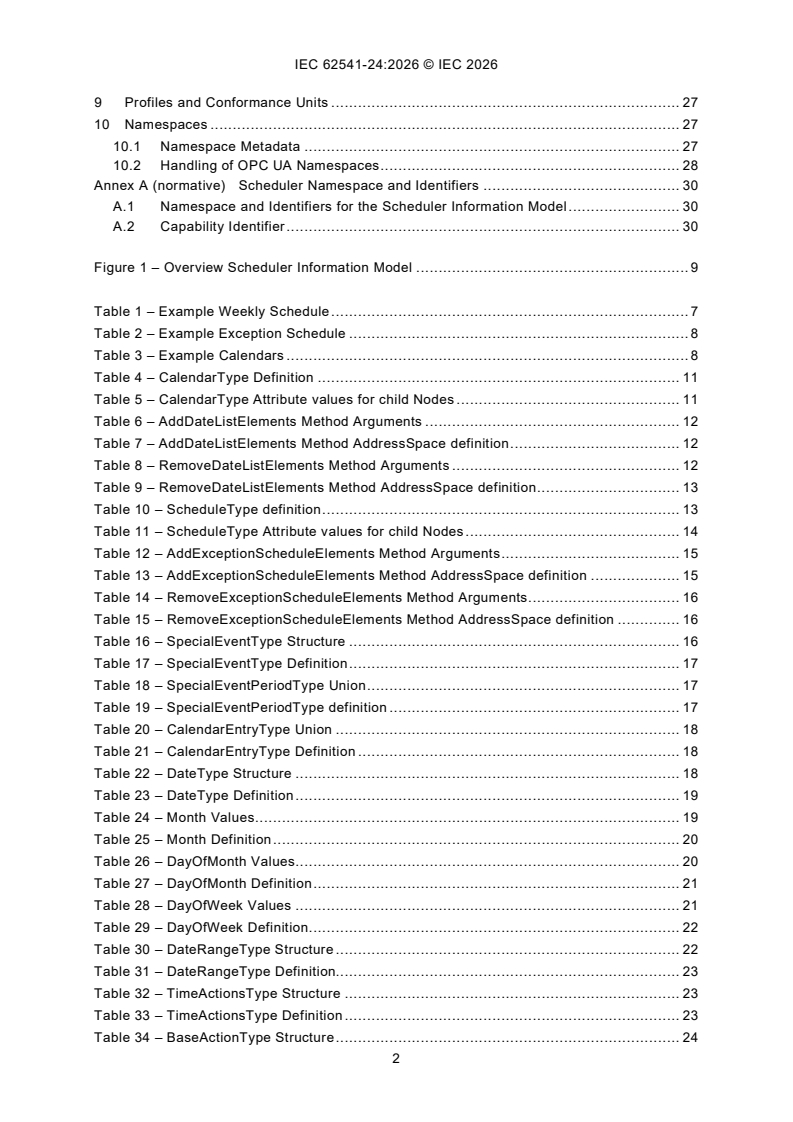
Figure 1 – Overview Scheduler Information Model . 9
Table 1 – Example Weekly Schedule . 7
Table 2 – Example Exception Schedule . 8
Table 3 – Example Calendars . 8
Table 4 – CalendarType Definition . 11
Table 5 – CalendarType Attribute values for child Nodes . 11
Table 6 – AddDateListElements Method Arguments . 12
Table 7 – AddDateListElements Method AddressSpace definition . 12
Table 8 – RemoveDateListElements Method Arguments . 12
Table 9 – RemoveDateListElements Method AddressSpace definition . 13
Table 10 – ScheduleType definition . 13
Table 11 – ScheduleType Attribute values for child Nodes . 14
Table 12 – AddExceptionScheduleElements Method Arguments . 15
Table 13 – AddExceptionScheduleElements Method AddressSpace definition . 15
Table 14 – RemoveExceptionScheduleElements Method Arguments . 16
Table 15 – RemoveExceptionScheduleElements Method AddressSpace definition . 16
Table 16 – SpecialEventType Structure . 16
Table 17 – SpecialEventType Definition . 17
Table 18 – SpecialEventPeriodType Union . 17
Table 19 – SpecialEventPeriodType definition . 17
Table 20 – CalendarEntryType Union . 18
Table 21 – CalendarEntryType Definition . 18
Table 22 – DateType Structure . 18
Table 23 – DateType Definition . 19
Table 24 – Month Values . 19
Table 25 – Month Definition . 20
Table 26 – DayOfMonth Values . 20
Table 27 – DayOfMonth Definition . 21
Table 28 – DayOfWeek Values . 21
Table 29 – DayOfWeek Definition . 22
Table 30 – DateRangeType Structure . 22
Table 31 – DateRangeType Definition. 23
Table 32 – TimeActionsType Structure . 23
Table 33 – TimeActionsType Definition . 23
Table 34 – BaseActionType Structure . 24
Table 35 – BaseActionType Definition . 24
Table 36 – WriteLocalVariableActionType Structure . 24
Table 37 – WriteLocalVariableActionType Definition. 25
Table 38 – CallLocalMethodActionType Structure . 25
Table 39 – CallLocalMethodActionType Definition . 25
Table 40 – TimeType Structure . 26
Table 41 – TimeType Definition. 26
Table 42 – DailyScheduleType Structure. 26
Table 43 – DailyScheduleType Definition . 27
Table 44 – Profile URIs for Scheduler . 27
Table 45 – NamespaceMetadata Object for this document . 28
Table 46 – Namespaces used in a Scheduler Server . 28
Table 47 – Namespaces used in this document . 29
INTERNATIONAL ELECTROTECHNICAL COMMISSION
____________
OPC unified architecture -
Part 24: Scheduler
FOREWORD
1) The International Electrotechnical Commission (IEC) is a worldwide organization for standardization comprising
all national electrotechnical committees (IEC National Committees). The object of IEC is to promote international
co-operation on all questions concerning standardization in the electrical and electronic fields. To this end and
in addition to other activities, IEC publishes International Standards, Technical Specifications, Technical Reports,
Publicly Available Specifications (PAS) and Guides (hereafter referred to as "IEC Publication(s)"). Their
preparation is entrusted to technical committees; any IEC National Committee interested in the subject dealt with
may participate in this preparatory work. International, governmental and non-governmental organizations liaising
with the IEC also participate in this preparation. IEC collaborates closely with the International Organization for
Standardization (ISO) in accordance with conditions determined by agreement between the two organizations.
2) The formal decisions or agreements of IEC on technical matters express, as nearly as possible, an international
consensus of opinion on the relevant subjects since each technical committee has representation from all
interested IEC National Committees.
3) IEC Publications have the form of recommendations for international use and are accepted by IEC National
Committees in that sense. While all reasonable efforts are made to ensure that the technical content of IEC
Publications is accurate, IEC cannot be held responsible for the way in which they are used or for any
misinterpretation by any end user.
4) In order to promote international uniformity, IEC National Committees undertake to apply IEC Publications
transparently to the maximum extent possible in their national and regional publications. Any divergence between
any IEC Publication and the corresponding national or regional publication shall be clearly indicated in the latter.
5) IEC itself does not provide any attestation of conformity. Independent certification bodies provide conformity
assessment services and, in some areas, access to IEC marks of conformity. IEC is not responsible for any
services carried out by independent certification bodies.
6) All users should ensure that they have the latest edition of this publication.
7) No liability shall attach to IEC or its directors, employees, servants or agents including individual experts and
members of its technical committees and IEC National Committees for any personal injury, property damage or
other damage of any nature whatsoever, whether direct or indirect, or for costs (including legal fees) and
expenses arising out of the publication, use of, or reliance upon, this IEC Publication or any other IEC
Publications.
8) Attention is drawn to the Normative references cited in this publication. Use of the referenced publications is
indispensable for the correct application of this publication.
9) IEC draws attention to the possibility that the implementation of this document may involve the use of (a)
patent(s). IEC takes no position concerning the evidence, validity or applicability of any claimed patent rights in
respect thereof. As of the date of publication of this document, IEC had not received notice of (a) patent(s), which
may be required to implement this document. However, implementers are cautioned that this may not represent
the latest information, which may be obtained from the patent database available at https://patents.iec.ch. IEC
shall not be held responsible for identifying any or all such patent rights.
IEC 62541-24 has been prepared by subcommittee 65E: Devices and integration in enterprise
systems, of IEC technical committee 65: Industrial-process measurement, control and
automation. It is an International Standard.
The text of this International Standard is based on the following documents:
Draft Report on voting
65E/1049/CDV 65E/1106/RVC
Full information on the voting for its approval can be found in the report on voting indicated in
the above table.
The language used for the development of this International Standard is English.
This document was drafted in accordance with ISO/IEC Directives, Part 2, and developed in
accordance with ISO/IEC Directives, Part 1 and ISO/IEC Directives, IEC Supplement, available
at www.iec.ch/members_experts/refdocs. The main document types developed by IEC are
described in greater detail at www.iec.ch/publications.
Throughout this document and the other Parts of the series, certain document conventions are
used:
Italics are used to denote a defined term or definition that appears in the "Terms and definitions"
clause in one of the parts of the series.
Italics are also used to denote the name of a service input or output parameter or the name of
a structure or element of a structure that are usually defined in tables.
The italicized terms and names are also often written in camel-case (the practice of writing
compound words or phrases in which the elements are joined without spaces, with each
element's initial letter capitalized within the compound). For example, the defined term is
AddressSpace instead of Address Space. This makes it easier to understand that there is a
single definition for AddressSpace, not separate definitions for Address and Space.
A list of all parts in the IEC 62541 series, published under the general title OPC Unified
Architecture, can be found on the IEC website.
The committee has decided that the contents of this document will remain unchanged until the
stability date indicated on the IEC website under webstore.iec.ch in the data related to the
specific document. At this date, the document will be
– reconfirmed,
– withdrawn, or
– revised.
1 Scope
This part of IEC 62541 specifies an OPC UA information model to expose information, at what
dates and times specific actions are executed by the OPC UA Server. Those schedules can
optionally also be manipulated via the information model.
The schedule defines on which dates they are active, and can also reference global calendars
representing specific dates, for example public holidays. In addition, the schedule defines times
and actions that will be executed at that time. The model defines writing Variables and calling
Methods but can be extended to other actions as well.
The NamespaceUri for all NodeIds defined in this document is defined in Annex A.
2 Normative references
The following documents are referred to in the text in such a way that some or all of their content
constitutes requirements of this document. For dated references, only the edition cited applies.
For undated references, the latest edition of the referenced document (including any
amendments) applies.
IEC 62541-1, OPC Unified Architecture - Part 1: Overview and Concepts
IEC 62541-3, OPC Unified Architecture - Part 3: Address Space Model
IEC 62541-4, OPC Unified Architecture - Part 4: Services
IEC 62541-5, OPC Unified Architecture - Part 5: Information Model
IEC 62541-6, OPC Unified Architecture - Part 6: Mappings
IEC 62541-7, OPC Unified Architecture - Part 7: Profiles
3 Terms, definitions and abbreviated terms
3.1 Terms and definitions
For the purposes of this document, the terms and definitions given in IEC 62541-1,
IEC 62541-3, IEC 62541-4, IEC 62541-5, IEC 62541-7 apply.
ISO and IEC maintain terminology databases for use in standardization at the following
addresses:
– IEC Electropedia: available at https://www.electropedia.org/
– ISO Online browsing platform: available at https://www.iso.org/obp
NOTE It is assumed that basic concepts of OPC UA information modelling are understood in this document. This
document will use these concepts to describe the Scheduler Information Model.
3.2 Abbreviated terms
HTTP Hypertext Transfer Protocol
PMS Production Management System
URI Uniform Resource Identifier
XML Extensible Markup Language
4 General information to Scheduler
Schedulers allow to define per day of the week specific times at which specific actions are
executed in the OPC UA Server.
In addition, schedulers can define special dates and times at which specific actions are
executed in the OPC UA Server. If such a date occurs, the actions of the special date are
executed, and the weekly schedule is ignored.
A scheduler can define the special dates by either
– defining a concrete date (e.g., 2022-01-17),
– defining a range of dates (e.g., 2022-01-17 until 2022-04-13)
st
– defining repeating dates with wildcards (e.g., every 1 January)
– or referencing global calendars containing for example all public holidays of a year
Per date an array of times and corresponding actions including parameterization is defined,
when the action is executed. Actions can be the writing of Variables or calling Methods but can
also be extended to other actions.
5 Use cases
5.1 UC01: Scheduling actions on specific times on each weekday
The user wants to schedule that at specific times on each individual weekday a specific action
is executed, for example the heating is set to a specific setpoint. In Table 1, an example of such
a schedule is given. It contains the schedule for the heating of a school building, that is not
used over the weekend. For example, it can be used to disable the schedule, e.g. when it is
warm outside during summer.
Table 1 – Example Weekly Schedule
Monday Tuesday Wednesday Thursday Friday Saturday Sunday
00:00 07:00 07:00 07:00 07:00 00:00 00:00
Night On On On On Off Off
07:00 16:30 16:30 16:30 16:30
On Night Night Night Off
16:30
Night
5.2 UC02: Scheduling actions on special dates
5.2.1 Overview
The user wants to schedule that on special dates or date periods a specific action is executed,
for example switching off the heating during public holidays. The user wants to be able to define
those dates individual or reference predefined dates that can be used in several schedules. In
Table 2, an example is given.
Table 2 – Example Exception Schedule
Date
Time Value Priority
Day Interval Recurring Reference
Every 05:00 On 11
Saturday of (School
12:00 Off
March 2022 board)
05:00 On
2022-04-03 – 12
2022-04-07 (IT user)
16:30 Off
05:00 On 13
2022-04-01 (facility
manager)
CAL1
Variable 00:00 Off 14
Holidays
CAL2
00:00 Off 15
Set Holidays
CAL3
School 00:00 Off 16
Vacation
The calendars referenced in Table 2 are defined in Table 3.
Table 3 – Example Calendars
Day Interval Recurring Note
CAL1: Variable Holidays
2022-04-18 Easter Monday
2022-05-26 Ascension Day
CAL2: Set Holidays
Jan 01. New Year's
Jan 06. Epiphany
Dec 24. Christmas Eve
Dec 25. Christmas Day
Dec 26. Christmas Day
CAL3: School Vacation
2022-02-21 – 2022-02-25
2022-07-25 – 2022-09-02
2022-12-23 – 2023-01-02
The example shows more detailed use cases, summarized in the following subsections.
5.2.2 UC002.1: Schedule actions at a specific date
As shown in Table 2 in the third entry, a special schedule on a specific date (2022-04-01) shall
be applied.
5.2.3 UC002.2: Schedule actions at an interval from a specific date to a specific date
As shown in Table 2 in the second entry, a special schedule on a specific interval
(2022-04-03 – 2022-04-07) shall be applied.
5.2.4 UC002.3 Schedule actions at a recurring interval
As shown in Table 2 in the first entry, a special schedule on a recurring interval (every Saturday
per of March 2022) shall be applied.
5.2.5 UC002.4 Schedule actions at specific dates defined globally
As shown in Table 2 in the last three entries, a special schedule shall be applied on dates
defined globally. The global definition shall support concrete dates (CAL1), recurring dates
(CAL2) and concrete ranges (CAL3).
6 Scheduler Information Model overview
6.1 Overview
This document defines two main ObjectTypes:
– an instance of CalendarType represent a globally defined set of dates that can be referenced
by schedule Objects;
– an instance of ScheduleType represent a schedule, that defines for specific dates or
weekdays specific times and actions, that shall be executed at those times.
An overview is given in Figure 1. Instances of ScheduleType can have a WeeklySchedule,
defining per weekday specific times and per specific time a list of actions that shall be executed
at that time. Optionally, the WeeklySchedule can be configured by OPC UA Clients.
In addition, or as alternative, a schedule Object can have a ExceptionSchedule. This defines
special dates (days), either by defining a concrete date, a range of dates, or recurring dates, or
by referencing instances of CalendarType. The optional Methods
AddExceptionScheduleElements and RemoveExceptionScheduleElements can be used to
configure the ExceptionSchedule by an OPC UA Client.
Figure 1 – Overview Scheduler Information Model
The CalendarType defines a DateList with specific dates. The optional AddDateListElements
and RemoveDateListElements Methods can be used to manipulate the DateList Property by
OPC UA Clients.
This document does not define any specific entry points where to find schedule or calendar
Objects. It is expected that they are placed reasonable in the AddressSpace, for example as
child Object of an Object that is manipulated by actions of the schedule Object.
This document does not define any specific mechanism how new schedule or calendar Objects
are added or removed via OPC UA. Information Models using those Objects might define
specific mechanisms like Methods or using the NodeManagement Service Set.
6.2 Scheduling Times and Priorities
A schedule Object can contain a WeeklySchedule with one entry per weekday and / or an
ExceptionSchedule. One of both shall be defined. The WeeklySchedule contains for each day
actions, that should be taken at specific times. The ExceptionSchedule contains specific dates
or ranges of dates, and the corresponding actions that should be taken at specific times. For
example, the ExceptionSchedule can contain an entry with all public holidays and another with
plant holidays. Since the different entries of the ExceptionSchedule might overlap, each entry
contains a priority. If overlapping entries exist, the one with the highest priority is used. If both,
WeeklySchedule and ExceptionSchedule exist, the exception schedule has priority over the
WeeklySchedule. That is, if the exception schedule has a matching date, the exception
schedule is used, otherwise the weekly schedule.
6.3 Start-up of Schedules
When a Server restarts or starts the first time, and when a schedule Object becomes active (by
reaching its EffectivePeriod, see 7.2.2) there are two options how a schedule Object shall react.
If the ApplyLastAfterStart Property is set to TRUE, the Server shall find the last set of actions
that will be executed before the current time and execute those actions. The mechanism to find
the last set of actions is to find the last element in the list of TimeActionsType that occurs on
or before the current time, and then use that element's actions. If no such element is found,
then no action is executed.
If the ApplyLastAfterStart Property is set to FALSE, the Server does not consider any previous
actions and starts executing actions according to the defined schedule defined in the future.
7 OPC UA ObjectTypes
7.1 CalendarType
7.1.1 Overview
The CalendarType provides a list of calendar dates. Each entry in the list describes a specific
date or date pattern, or range of dates. The CalendarType ObjectType is formally defined in
Table 4.
7.1.2 ObjectType definition
Table 4 – CalendarType Definition
Attribute Value
BrowseName CalendarType
IsAbstract False
Description Provides a list of calendar dates. Each entry in the list describes a specific date or date
pattern, or range of dates
References NodeClass BrowseName DataType TypeDefinition Other
Subtype of the 0:BaseObjectType
0:HasComponent Variable PresentValue 0:Boolean 0:BaseDataVariableTy M
pe
0:HasProperty Variable DateList CalendarEntryTyp 0:PropertyType M
e[]
0:HasComponent Method AddDateListElements O
0:HasComponent Method RemoveDateListElements O
Conformance Units
Scheduler Calendar Base
This PresentValue indicates the current value of the calendar: True if the current date is in the
DateList and False if it is not. For the current date that local time of the OPC UA Server shall
be considered.
The DateList is an array of elements of which each is either a specific date or date pattern, or
range of dates.
The child Nodes of the CalendarType have additional Attribute values defined in Table 5.
Table 5 – CalendarType Attribute values for child Nodes
BrowsePath Description Attribute
PresentValue Indicates if the current date is in the DateList (true) or not (false)
DateList Array of elements each defining either a specific date or date pattern, or range of
dates
AddDateListElements Adds elements to the DateList
RemoveDateListElements Removes elements of the DateList
7.1.3 Method AddDateListElements
This Method adds entries to the DateList Property. Even if one entry cannot be added, the other
entries are still processed and added, if possible. The signature of this Method is specified
below. Table 6 and Table 7 specify the Arguments and AddressSpace representation,
respectively.
Signature
AddDateListElements (
[in] CalendarEntryType[] CalendarEntries
[out] 0:Int32[] EntryResults
);
Table 6 – AddDateListElements Method Arguments
Argument Description
CalendarEntries An array of calendar entries that shall be added to the DateList Property.
EntryResults An array of results, one entry per entry in CalendarEntries, indicating if the individual entry
could be added. Each result <> 0 indicates, that adding this calendar entry was not
successful.
0 – OK
-1 – Duplicate – Entry already in DateList
-2 – Invalid Format – The entry contains an invalid format, e.g. an invalid range
Values larger 0 can be used for vendor-specific errors.
7.1.3.1 Method Result Codes (defined in Call
...
IEC 62541-24 ®
Edition 1.0 2026-01
NORME
INTERNATIONALE
Architecture unifiée OPC -
Partie 24: Ordonnanceur
ICS 25.040 ISBN 978-2-8327-0875-0
Droits de reproduction réservés. Sauf indication contraire, aucune partie de cette publication ne peut être reproduite ni
utilisée sous quelque forme que ce soit et par aucun procédé, électronique ou mécanique, y compris la photocopie et
les microfilms, sans l'accord écrit de l'IEC ou du Comité national de l'IEC du pays du demandeur. Si vous avez des
questions sur le copyright de l'IEC ou si vous désirez obtenir des droits supplémentaires sur cette publication, utilisez
les coordonnées ci-après ou contactez le Comité national de l'IEC de votre pays de résidence.
IEC Secretariat Tel.: +41 22 919 02 11
3, rue de Varembé info@iec.ch
CH-1211 Geneva 20 www.iec.ch
Switzerland
A propos de l'IEC
La Commission Electrotechnique Internationale (IEC) est la première organisation mondiale qui élabore et publie des
Normes internationales pour tout ce qui a trait à l'électricité, à l'électronique et aux technologies apparentées.
A propos des publications IEC
Le contenu technique des publications IEC est constamment revu. Veuillez vous assurer que vous possédez l’édition la
plus récente, un corrigendum ou amendement peut avoir été publié.
Recherche de publications IEC - IEC Products & Services Portal - products.iec.ch
webstore.iec.ch/advsearchform Découvrez notre puissant moteur de recherche et consultez
La recherche avancée permet de trouver des publications gratuitement tous les aperçus des publications, symboles
IEC en utilisant différents critères (numéro de référence, graphiques et le glossaire. Avec un abonnement, vous aurez
texte, comité d’études, …). Elle donne aussi des toujours accès à un contenu à jour adapté à vos besoins.
informations sur les projets et les publications remplacées
ou retirées. Electropedia - www.electropedia.org
Le premier dictionnaire d'électrotechnologie en ligne au
IEC Just Published - webstore.iec.ch/justpublished monde, avec plus de 22 500 articles terminologiques en
Restez informé sur les nouvelles publications IEC. Just anglais et en français, ainsi que les termes équivalents
Published détaille les nouvelles publications parues. dans 25 langues additionnelles. Egalement appelé
Disponible en ligne et une fois par mois par email. Vocabulaire Electrotechnique International (IEV) en ligne.
Service Clients - webstore.iec.ch/csc
Si vous désirez nous donner des commentaires sur cette
publication ou si vous avez des questions contactez-
nous: sales@iec.ch.
SOMMAIRE
AVANT-PROPOS . 4
1 Domaine d'application . 6
2 Références normatives . 6
3 Termes, définitions et abréviations . 6
3.1 Termes et définitions. 6
3.2 Abréviations . 7
4 Informations générales concernant l'Ordonnanceur . 7
5 Cas d'utilisation . 7
5.1 UC01: Programmation d'actions à des heures spécifiques chaque jour de la
semaine . 7
5.2 UC02: Programmation d'actions à dates spéciales . 8
5.2.1 Vue d'ensemble . 8
5.2.2 UC002.1: Programmation d'actions à une date précise . 9
5.2.3 UC002.2: Programmation d'actions à un intervalle entre deux dates
précises . 9
5.2.4 UC00.2.3 Programmation d'actions à un intervalle récurrent . 9
5.2.5 UC002.4 Programmation d'actions à des dates spécifiques définies
globalement . 9
6 Vue d'ensemble du Modèle d'information de l'Ordonnanceur . 9
6.1 Vue d'ensemble . 9
6.2 Programmation des horaires et des priorités . 10
6.3 Démarrage des programmes . 10
7 ObjectTypes OPC UA . 11
7.1 CalendarType. 11
7.1.1 Vue d'ensemble . 11
7.1.2 Définition d'ObjectType. 11
7.1.3 Méthode AddDateListElements . 12
7.1.4 Méthode RemoveDateListElements . 13
7.2 Définition de ScheduleType . 13
7.2.1 Vue d'ensemble . 13
7.2.2 Définition d'ObjectType. 14
7.2.3 Méthode AddExceptionScheduleElements . 15
7.2.4 Méthode RemoveExceptionScheduleElements . 16
8 DataTypes OPC UA . 17
8.1 SpecialEventType . 17
8.2 SpecialEventPeriodType . 18
8.3 CalendarEntryType . 18
8.4 DateType . 19
8.5 Month . 20
8.6 DayOfMonth . 20
8.7 DayOfWeek. 22
8.8 DateRangeType . 23
8.9 TimeActionsType . 23
8.10 BaseActionType . 24
8.11 WriteLocalVariableActionType . 25
8.12 CallLocalMethodActionType . 25
8.13 TimeType . 26
8.14 DailyScheduleType . 27
9 Profils et Unités de Conformité . 27
10 Espaces de noms . 28
10.1 Métadonnées de l'espace de noms . 28
10.2 Gestion des Espaces de noms OPC UA . 28
Annexe A (normative) Espace de noms et identificateurs d'Ordonnanceur . 30
A.1 Espace de noms et identificateurs pour le Modèle d'information
d'Ordonnanceur . 30
A.2 Identificateur de capacité . 30
Figure 1 – Vue d'ensemble du Modèle d'information de l'Ordonnanceur . 10
Tableau 1 – Exemple de programme hebdomadaire . 7
Tableau 2 – Exemple de programme d'exception . 8
Tableau 3 – Exemples de calendriers . 8
Tableau 4 – Définition de CalendarType . 11
Tableau 5 – Valeurs d'Attribut CalendarType pour les Nœuds enfants . 12
Tableau 6 – Arguments de la Méthode AddDateListElements . 12
Tableau 7 – Définition de l'AddressSpace pour la Méthode AddDateListElements . 12
Tableau 8 – Arguments de la Méthode RemoveDateListElements . 13
Tableau 9 – Définition de l'AddressSpace pour la Méthode RemoveDateListElements . 13
Tableau 10 – Définition de ScheduleType . 14
Tableau 11 – Valeurs d'Attribut ScheduleType pour les Nœuds enfants . 15
Tableau 12 – Arguments de la Méthode AddExceptionScheduleElements . 16
Tableau 13 – Définition de l'AddressSpace pour la Méthode
AddExceptionScheduleElements . 16
Tableau 14 – Arguments de la Méthode RemoveExceptionScheduleElements . 17
Tableau 15 – Définition de l'AddressSpace pour la Méthode
RemoveExceptionScheduleElements . 17
Tableau 16 – Structure de SpecialEventType . 17
Tableau 17 – Définition de SpecialEventType . 18
Tableau 18 – Union de SpecialEventPeriodType . 18
Tableau 19 – Définition de SpecialEventPeriodType . 18
Tableau 20 – Union de CalendarEntryType . 18
Tableau 21 – Définition de CalendarEntryType . 19
Tableau 22 – Structure de DateType . 19
Tableau 23 – Définition de DateType . 19
Tableau 24 – Valeurs de Month . 20
Tableau 25 – Définition de Month . 20
Tableau 26 – Valeurs de DayOfMonth . 21
Tableau 27 – Définition de DayOfMonth . 22
Tableau 28 – Valeurs de DayOfWeek . 22
Tableau 29 – Définition de DayOfWeek . 22
Tableau 30 – Structure de DateRangeType . 23
Tableau 31 – Définition de DateRangeType . 23
Tableau 32 – Structure de TimeActionsType . 24
Tableau 33 – Définition de TimeActionsType . 24
Tableau 34 – Structure de BaseActionType . 24
Tableau 35 – Définition de BaseActionType . 25
Tableau 36 – Structure de WriteLocalVariableActionType . 25
Tableau 37 – Définition de WriteLocalVariableActionType . 25
Tableau 38 – Structure de CallLocalMethodActionType . 26
Tableau 39 – Définition de CallLocalMethodActionType . 26
Tableau 40 – Structure de TimeType . 26
Tableau 41 – Définition de TimeType. 27
Tableau 42 – Structure de DailyScheduleType . 27
Tableau 43 – Définition de DailyScheduleType . 27
Tableau 44 – URI de Profil pour l'Ordonnanceur . 28
Tableau 45 – Objet NamespaceMetadata pour le présent document . 28
Tableau 46 – Espaces de noms utilisés dans un Serveur d'Ordonnanceur . 29
Tableau 47 – Espaces de noms utilisés dans le présent document . 29
COMMISSION ÉLECTROTECHNIQUE INTERNATIONALE
____________
Architecture unifiée OPC -
Partie 24: Ordonnanceur
AVANT-PROPOS
1) La Commission Électrotechnique Internationale (IEC) est une organisation mondiale de normalisation composée
de l'ensemble des comités électrotechniques nationaux (Comités nationaux de l'IEC). L'IEC a pour objet de
favoriser la coopération internationale pour toutes les questions de normalisation dans les domaines de
l'électricité et de l'électronique. À cet effet, l'IEC – entre autres activités – publie des Normes internationales,
des Spécifications techniques, des Rapports techniques, des Spécifications accessibles au public (PAS) et des
Guides (ci-après dénommés "Publication(s) de l'IEC"). Leur élaboration est confiée à des comités d'études, aux
travaux desquels tout Comité national intéressé par le sujet traité peut participer. Les organisations
internationales, gouvernementales et non gouvernementales, en liaison avec l'IEC, participent également aux
travaux. L'IEC collabore étroitement avec l'Organisation Internationale de Normalisation (ISO), selon des
conditions fixées par accord entre les deux organisations.
2) Les décisions ou accords officiels de l'IEC concernant les questions techniques représentent, dans la mesure du
possible, un accord international sur les sujets étudiés, étant donné que les Comités nationaux de l'IEC intéressés
sont représentés dans chaque comité d'études.
3) Les Publications de l'IEC se présentent sous la forme de recommandations internationales et sont agréées
comme telles par les Comités nationaux de l'IEC. Tous les efforts raisonnables sont entrepris afin que
l'IEC s'assure de l'exactitude du contenu technique de ses publications; l'IEC ne peut pas être tenue responsable
de l'éventuelle mauvaise utilisation ou interprétation qui en est faite par un quelconque utilisateur final.
4) Dans le but d'encourager l'uniformité internationale, les Comités nationaux de l'IEC s'engagent, dans toute la
mesure possible, à appliquer de façon transparente les Publications de l'IEC dans leurs publications nationales
et régionales. Toutes divergences entre toutes Publications de l'IEC et toutes publications nationales ou
régionales correspondantes doivent être indiquées en termes clairs dans ces dernières.
5) L'IEC elle-même ne fournit aucune attestation de conformité. Des organismes de certification indépendants
fournissent des services d'évaluation de conformité et, dans certains secteurs, accèdent aux marques de
conformité de l'IEC. L'IEC n'est responsable d'aucun des services effectués par les organismes de certification
indépendants.
6) Tous les utilisateurs doivent s'assurer qu'ils sont en possession de la dernière édition de cette publication.
7) Aucune responsabilité ne doit être imputée à l'IEC, à ses administrateurs, employés, auxiliaires ou mandataires,
y compris ses experts particuliers et les membres de ses comités d'études et des Comités nationaux de l'IEC,
pour tout préjudice causé en cas de dommages corporels et matériels, ou de tout autre dommage de quelque
nature que ce soit, directe ou indirecte, ou pour supporter les coûts (y compris les frais de justice) et les dépenses
découlant de la publication ou de l'utilisation de cette Publication de l'IEC ou de toute autre Publication de l'IEC,
ou au crédit qui lui est accordé.
8) L'attention est attirée sur les références normatives citées dans cette publication. L'utilisation de publications
référencées est obligatoire pour une application correcte de la présente publication.
9) L'IEC attire l'attention sur le fait que la mise en application du présent document peut entraîner l'utilisation d'un
ou de plusieurs brevets. L'IEC ne prend pas position quant à la preuve, à la validité et à l'applicabilité de tout
droit de brevet revendiqué à cet égard. À la date de publication du présent document, l'IEC n'avait pas reçu
notification qu'un ou plusieurs brevets pouvaient être nécessaires à sa mise en application. Toutefois, il y a lieu
d'avertir les responsables de la mise en application du présent document que des informations plus récentes
sont susceptibles de figurer dans la base de données de brevets, disponible à l'adresse https://patents.iec.ch.
L'IEC ne saurait être tenue pour responsable de ne pas avoir identifié tout ou partie de tels droits de brevet.
L'IEC 62541-24 a été établie par le sous-comité 65E: Les dispositifs et leur intégration dans les
systèmes de l'entreprise, du comité d'études 65 de l'IEC: Mesure, commande et automation
dans les processus industriels. Il s'agit d'une Norme internationale.
Le texte de cette Norme internationale est issu des documents suivants:
Projet Rapport de vote
65E/1049/CDV 65E/1106/RVC
Le rapport de vote indiqué dans le tableau ci-dessus donne toute information sur le vote ayant
abouti à son approbation.
La langue employée pour l'élaboration de cette Norme internationale est l'anglais.
Ce document a été rédigé selon les Directives ISO/IEC, Partie 2, il a été développé selon les
Directives ISO/IEC, Partie 1 et les Directives ISO/IEC, Supplément IEC, disponibles sous
www.iec.ch/members_experts/refdocs. Les principaux types de documents développés par
l'IEC sont décrits plus en détail sous www.iec.ch/publications.
Dans l'ensemble du présent document et dans les autres parties de la série, certaines
conventions de document sont utilisées:
Le format italique est utilisé pour mettre en évidence un terme défini ou une définition qui
apparaît à l'article "Termes et définitions" dans l'une des parties de la série.
Le format italique est également utilisé pour mettre en évidence le nom d'un paramètre d'entrée
ou de sortie de service, ou le nom d'une structure ou d'un élément de structure habituellement
défini dans les tableaux.
Par ailleurs, les termes et noms en italique sont souvent écrits en camel-case (pratique qui
consiste à joindre, sans espace, les éléments des mots ou expressions composés, la première
lettre de chaque élément étant en majuscule). Par exemple, le terme défini est AddressSpace
et non Espace d'Adressage. Cela permet de mieux comprendre qu'il existe une définition unique
pour AddressSpace, et non deux définitions distinctes pour Espace et pour Adressage.
Une liste de toutes les parties de la série IEC 62541, publiées sous le titre général Architecture
unifiée OPC, se trouve sur le site web de l'IEC.
Le comité a décidé que le contenu de ce document ne sera pas modifié avant la date de stabilité
indiquée sur le site web de l'IEC sous webstore.iec.ch dans les données relatives au document
recherché. À cette date, le document sera
– reconduit,
– supprimé, ou
– révisé.
1 Domaine d'application
La présente partie de l'IEC 62541 spécifie un Modèle d'information OPC UA pour présenter des
informations, aux dates et heures auxquelles des actions spécifiques sont exécutées par le
Serveur OPC UA. Ces programmes peuvent aussi être éventuellement manipulés au travers du
modèle d'information.
Le programme définit les dates auxquelles les actions ont lieu, et peut également référencer
des calendriers globaux indiquant des dates spécifiques, comme les jours fériés. De plus, le
programme définit les heures et les actions exécutées au moment indiqué. Le modèle définit
l'écriture de Variables et l'appel de Méthodes, mais peut également être étendu à d'autres
actions.
Le NamespaceUri pour tous les NodeIds définis dans le présent document est défini à
l'Annexe A.
2 Références normatives
Les documents suivants sont cités dans le texte de sorte qu'ils constituent, pour tout ou partie
de leur contenu, des exigences du présent document. Pour les références datées, seule
l'édition citée s'applique. Pour les références non datées, la dernière édition du document de
référence s'applique (y compris les éventuels amendements).
IEC 62541-1, Architecture unifiée OPC - Partie 1: Vue d'ensemble et concepts
IEC 62541-3, Architecture unifiée OPC - Partie 3: Modèle d'espace d'adressage
IEC 62541-4, Architecture unifiée OPC - Partie 4: Services
IEC 62541-5, Architecture unifiée OPC - Partie 5: Modèle d'information
IEC 62541-6, Architecture unifiée OPC - Partie 6: Mappings
IEC 62541-7, Architecture unifiée OPC - Partie 7: Profils
3 Termes, définitions et abréviations
3.1 Termes et définitions
Pour les besoins du présent document, les termes et définitions de l'IEC 62541-1,
l'IEC 62541-3, l'IEC 62541-4, l'IEC 62541-5 et l'IEC 62541-7 s'appliquent.
L'ISO et l'IEC tiennent à jour des bases de données terminologiques destinées à être utilisées
en normalisation, consultables aux adresses suivantes:
– IEC Electropedia: disponible à l'adresse https://www.electropedia.org/
– ISO Online browsing platform: disponible à l'adresse https://www.iso.org/obp
NOTE Il est admis par hypothèse que les concepts de base de la modélisation des informations OPC UA sont
compris dans le présent document. Dans le présent document, ces concepts décrivent le Modèle d'information de
l'Ordonnanceur.
3.2 Abréviations
HTTP (Hypertext Transfer Protocol) Protocole de transport hypertexte
PMS (Production Management System) Système de gestion de la production
URI (Uniform Resource Identifier) Identificateur uniforme de ressources
XML (eXtensible Markup Language) Langage de balisage étendu
4 Informations générales concernant l'Ordonnanceur
Les Ordonnanceurs permettent de définir, pour chaque jour de la semaine, des heures
spécifiques au cours desquelles des actions spécifiques sont exécutées dans le Serveur
OPC UA.
De plus, les Ordonnanceurs peuvent définir des dates et des heures particulières auxquelles
des actions spécifiques sont exécutées dans le Serveur OPC UA. Dans ce cas, les actions de
la date particulière sont exécutées et l'horaire hebdomadaire est ignoré.
Un Ordonnanceur peut définir les dates spéciales soit:
– en déterminant une date précise (par exemple, 17-01-2022),
– en déterminant une plage de dates (par exemple, entre le 17/01/2022 et le 13/04/2022),
– en déterminant des dates répétées avec caractères génériques (par exemple, tous les
er
1 janvier),
– soit en référençant des calendriers globaux contenant, par exemple, tous les jours fériés
d'une année.
Lorsque l'action est exécutée, pour chaque date, une matrice de temps et d'actions
correspondantes, y compris le paramétrage, est définie. Les actions peuvent être l'écriture de
Variables, l'appel de Méthodes ou même d'autres actions.
5 Cas d'utilisation
5.1 UC01: Programmation d'actions à des heures spécifiques chaque jour de la
semaine
L'utilisateur souhaite programmer l'exécution d'une action spécifique à un moment précis,
chaque jour de la semaine. Par exemple, pour régler le chauffage à un point de consigne
spécifique. Le Tableau 1 donne un exemple de cette programmation. Il comprend le programme
de chauffage d'une école qui n'est pas fréquentée le week-end. Par exemple, il peut être utilisé
pour désactiver le programme lorsqu'il fait chaud à l'extérieur pendant l'été.
Tableau 1 – Exemple de programme hebdomadaire
Dimanche
Mardi Mercredi Jeudi Vendredi Samedi
Lundi
00:00
07:00 07:00 07:00 07:00 00:00
00:00
Arrêt
Marche Marche Marche Marche Arrêt
Nuit
16:30 16:30 16:30 16:30
07:00
Nuit Nuit Nuit Arrêt
Marche
16:30
Nuit
5.2 UC02: Programmation d'actions à dates spéciales
5.2.1 Vue d'ensemble
L'utilisateur souhaite programmer l'exécution d'une action spécifique à des dates ou périodes
spéciales. Par exemple, éteindre le chauffage les jours fériés. L'utilisateur souhaite être
capable de définir ces dates individuelles ou des dates de référence prédéfinies qui peuvent
servir dans plusieurs programmes. Un exemple est fourni dans le Tableau 2.
Tableau 2 – Exemple de programme d'exception
Date
Heure Valeur Priorité
Jour Intervalle Répétition Référence
Tous les 11
05:00:00 Marche
samedis de (Conseil
12:00:00 Arrêt
mars 2022 scolaire)
05:00:00 Marche
2022-04-03 –
(Utilisateur
2022-04-07
16:30:00 Arrêt
informatique)
05:00:00 Marche 13
(Gestionnaire
2022-04-01
des
installations)
CAL1
Jours fériés 00:00:00 Arrêt 14
variables
CAL2
Jours fériés 00:00:00 Arrêt 15
fixes
CAL3
Vacances 00:00:00 Arrêt 16
scolaires
Les calendriers référencés dans le Tableau 2 sont définis dans le Tableau 3.
Tableau 3 – Exemples de calendriers
Jour Intervalle Répétition Note
CAL1: Jours fériés variables
2022-04-18 Lundi de Pâques
2022-05-26 Ascension
CAL2: Jours fériés fixes
01 jan. Nouvel An
06 jan. Épiphanie
24 déc. Réveillon de Noël
25 déc. Noël
26 déc. Noël
CAL3: Vacances scolaires
2022-02-21 – 2022-02-25
2022-07-25 – 2022-09-02
2022-12-23 – 2023-01-02
L'exemple montre des cas d'utilisation plus détaillés, récapitulés dans les paragraphes
suivants.
5.2.2 UC002.1: Programmation d'actions à une date précise
Comme cela est indiqué à la troisième ligne du Tableau 2, une programmation spéciale doit
être appliquée à une date précise (2022-04-01).
5.2.3 UC002.2: Programmation d'actions à un intervalle entre deux dates précises
Comme cela est indiqué à la deuxième ligne du Tableau 2, une programmation spéciale doit
être appliquée sur un intervalle spécifique (2022-04-03 – 2022-04-07).
5.2.4 UC00.2.3 Programmation d'actions à un intervalle récurrent
Comme cela est indiqué à la première ligne du Tableau 2, une programmation spéciale
récurrente doit être appliquée (tous les samedis de mars 2022).
5.2.5 UC002.4 Programmation d'actions à des dates spécifiques définies globalement
Comme cela est indiqué dans les trois dernières lignes du Tableau 2, une programmation
spéciale doit être appliquée aux dates définies globalement. La définition globale doit prendre
en charge les dates concrètes (CAL1), les dates récurrentes (CAL2) et les périodes concrètes
(CAL3).
6 Vue d'ensemble du Modèle d'information de l'Ordonnanceur
6.1 Vue d'ensemble
Le présent document définit deux ObjectTypes principaux:
– une instance de CalendarType représente un ensemble global de dates pouvant être
référencé par des Objets de programmation;
– une instance de ScheduleType représente une programmation qui définit des dates précises
ou des heures et des actions spécifiques aux jours de semaine, qui doivent être exécutées
à ces heures.
La Figure 1 représente une vue d'ensemble. Les instances de ScheduleType peuvent avoir un
WeeklySchedule, qui définit pour chaque jour de la semaine des heures spécifiques et, pour
chacune d'entre elles, une liste d'action qui doivent être exécutées au moment indiqué. Le
WeeklySchedule peut, optionnellement, être configuré par des Clients OPC UA.
De plus, ou en variante, un Objet de programmation peut disposer d'un ExceptionSchedule.
Ainsi, les dates spéciales (jours) sont définies soit par une date concrète, une plage de dates
ou des dates récurrentes, soit en faisant référence à des instances de CalendarType. Un Client
OPC UA peut configurer l'ExceptionSchedule au moyen des Méthodes facultatives
AddExceptionScheduleElements et RemoveExceptionScheduleElements.
Figure 1 – Vue d'ensemble du Modèle d'information de l'Ordonnanceur
Le CalendarType définit une DateList avec des dates précises. Les Clients OPC UA peuvent
manipuler la Propriété DateList au moyen des Méthodes facultatives RemoveDateListElements
et AddDateListElements.
Le présent document ne définit aucun point d'entrée spécifique pour les Objets de programme
ou de calendrier. Il est prévu qu'ils soient placés de manière raisonnable dans l'AddressSpace,
par exemple en tant qu'Objet enfant d'un Objet qui est manipulé par des actions de l'Objet de
programmation.
Le présent document ne définit aucun mécanisme spécifique relatif à l'ajout ou la suppression
de nouveaux Objets de programme ou de calendrier par l'intermédiaire de OPC UA. Les
modèles d'information qui utilisent ces Objets peuvent définir des mécanismes spécifiques tels
que des Méthodes ou en utilisant le Jeu de services NodeManagement.
6.2 Programmation des horaires et des priorités
Un Objet de programmation peut contenir un WeeklySchedule avec une entrée pour chaque
jour de la semaine et/ou un ExceptionSchedule. L'un des deux doit être défini. Le
WeeklySchedule contient pour chaque jour des actions qu'il convient d'exécuter à des heures
spécifiques. Le ExceptionSchedule contient des dates ou des plages de dates précises, ainsi
que les actions correspondantes qu'il convient d'exécuter à des heures spécifiques. Par
exemple, le ExceptionSchedule peut contenir une entrée avec tous les jours fériés et une autre
avec les jours fériés de l'entreprise. Étant donné que les différentes entrées du
ExceptionSchedule peuvent se chevaucher, chaque entrée contient une priorité. En cas
d'entrées se chevauchant, celle ayant la priorité la plus élevée est utilisée. S'il existe à la fois
unWeeklySchedule et un ExceptionSchedule, le programme d'exception a la priorité sur le
WeeklySchedule. En d'autres termes, si le programme d'exception comporte une date de
correspondance, celui-ci est utilisé, autrement, ce sera le programme hebdomadaire.
6.3 Démarrage des programmes
Lorsqu'un Serveur démarre une première fois ou redémarre, et lorsqu'un Objet de
programmation devient actif (en arrivant à son EffectivePeriod, voir 7.2.2), l'Objet de
programmation doit réagir suivant deux options.
Si la Propriété ApplyLastAfterStart est définie sur TRUE, le Serveur doit trouver le dernier
ensemble d'actions qui seront exécutées avant l'heure actuelle et procède à l'exécution de ces
actions. Le mécanisme de recherche du dernier ensemble d'actions consiste à trouver le dernier
élément dans la liste de TimeActionsType qui se produit à l'heure actuelle ou avant, puis à
utiliser les actions de cet élément. Dans le cas où aucun élément de ce type n'est trouvé,
aucune action n'est exécutée.
Si la Propriété ApplyLastAfterStart est définie sur FALSE, le Serveur ne tient compte d'aucune
action précédente et commence à exécuter des actions conformément au programme défini
ultérieurement.
7 ObjectTypes OPC UA
7.1 CalendarType
7.1.1 Vue d'ensemble
Le CalendarType fournit une liste de dates du calendrier. Chaque entrée de la liste décrit une
date ou une configuration de dates, ou une plage de dates. L'ObjectType CalendarType est
défini de manière formelle dans le Tableau 4.
7.1.2 Définition d'ObjectType
Tableau 4 – Définition de CalendarType
Attribut Valeur
BrowseName CalendarType
IsAbstract False
Description Fournit une liste de dates du calendrier. Chaque entrée de la liste décrit une date ou une
configuration de dates, ou une plage de dates
Références NodeClass BrowseName DataType TypeDefinition Autre
Sous-type du 0:BaseObjectType
0:HasComponent Variable PresentValue 0:Boolean 0:BaseDataVariableTy M
pe
0:HasProperty Variable DateList CalendarEntryTyp 0:PropertyType M
e[]
0:HasComponent Method AddDateListElements O
0:HasComponent Method RemoveDateListElements O
Unités de Conformité
Ordonnanceur Base de calendrier
Cette PresentValue indique la valeur actuelle du calendrier: Si la date actuelle est dans la
DateList, la valeur sera True, dans le cas contraire, ce sera False. L'heure locale du Serveur
OPC UA doit être prise en compte pour la date actuelle.
La DateList est une matrice d'éléments dont chacun est soit une date, soit une configuration de
date spécifique, ou encore une plage de dates.
Les Nœuds enfants du CalendarType ont des valeurs d'Attribut supplémentaires définies dans
le Tableau 5.
Tableau 5 – Valeurs d'Attribut CalendarType pour les Nœuds enfants
BrowsePath Attribut Description
PresentValue Indique si la date actuelle est dans la DateList (true) ou non (false)
DateList Matrice d'éléments qui définissent chacun soit une date, soit une configuration de
date spécifique, ou encore une plage de dates
AddDateListElements Ajoute des éléments à la DateList
RemoveDateListElements Supprime des éléments de la DateList
7.1.3 Méthode AddDateListElements
Cette Méthode ajoute des entrées à la Propriété DateList. Même si une entrée ne peut pas être
ajoutée, les autres sont toujours traitées et ajoutées, le cas échéant. La signature de cette
Méthode est spécifiée ci-dessous. Le Tableau 6 et le Tableau 7 spécifient les Arguments et la
représentation AddressSpace, respectivement.
Signature
AddDateListElements (
[in] CalendarEntryType[] CalendarEntries
[out] 0:Int32[] EntryResults
);
Tableau 6 – Arguments de la Méthode AddDateListElements
Argument Description
CalendarEntries Matrice d'entrées de calendrier qui doivent être ajoutées à la Propriété DateList.
EntryResults Matrice de résultats, une entrée par entrée dans le CalendarEntries, indiquant si une
entrée individuelle peut être ajoutée. Chaque résultat <> 0 indique que l'ajout de
cette entrée de calendrier a échoué.
0 – OK
-1 – Duplication – L'entrée est déjà dans DateList
-2 – Format invalide – L'entrée contient un format non valide, par exemple une plage
non valide
Les valeurs supérieures à 0 peuvent être utilisées pour des erreurs spécifiques au
fournisseur.
Codes de résultat de la méthode (définis dans le Service d'Appel)
7.1.3.1
Code de résultat Description
BadNodeIdUnknown L'IEC 62541-4 définit ce code.
BadNotWritable L'IEC 62541-4 définit ce code.
BadOutOfMemory L'IEC 62541-4 définit ce code.
Tableau 7 – Définition de l'AddressSpace pour la Méthode AddDateListElements
Attribut Valeur
BrowseName AddDateListElements
Références NodeClass BrowseName DataType TypeDefinition ModellingRule
0:HasProperty Variable 0:InputArguments 0:Argument[] 0:PropertyType 0:Mandatory
0:HasProperty Variable 0:OutputArguments 0:Argument[] 0:PropertyType 0:Mandatory
7.1.4 Méthode RemoveDateListElements
Cette Méthode supprime des entrées de la Propriété DateList. Même si une entrée ne peut pas
être supprimée, les autres sont toujours traitées et supprimées, le cas échéant. La signature
de cette Méthode est spécifiée ci-dessous. Le Tableau 8 et le Tableau 9 spécifient les
Arguments et la représentation AddressSpace, respectivement.
Signature
RemoveDateListElements (
[in] CalendarEntryType[] CalendarEntries
[out] 0:Int32[] EntryResults
);
Tableau 8 – Arguments de la Méthode RemoveDateListElements
Argument Description
CalendarEntries Matrice d'entrées de calendrier qui doivent être supprimées de la Propriété DateList.
EntryResults Matrice de résultats, une entrée par entrée dans le CalendarEntries, indiquant si une
entrée individuelle peut être supprimée. Chaque résultat <> 0 indique que la
suppression de cette entrée de calendrier a échoué.
0 – OK
-1 - Introuvable – L'entrée n'est pas dans la DateList
Les valeurs supérieures à 0 peuvent être utilisées pour des erreurs spécifiques au
fournisseur.
Codes de résultat de la méthode (définis dans le Service d'Appel)
Code de résultat Description
BadNodeIdUnknown Voir l'IEC 62541-4 pour une description générale.
BadNotWritable Voir l'IEC 62541-4 pour une description générale.
Tableau 9 – Définition de l'AddressSpace pour la Méthode RemoveDateListElements
Attribut Valeur
BrowseName RemoveDateListElements
Références NodeClass BrowseName DataType TypeDefinition ModellingRule
0:HasProperty Variable 0:InputArguments 0:Argument[] 0:PropertyType 0:Mandatory
0:HasProperty Variable 0:OutputArguments 0:Argument[] 0:PropertyType 0:Mandatory
7.2 Définition de ScheduleType
7.2.1 Vue d'ensemble
Le ScheduleType définit un programme périodique qui peut se répéter sur une plage de dates.
Le programme peut contenir des exceptions facultatives à des heures ou des dates arbitraires.
L'unité de base d'un programme est le nombre de jours, ceux-ci étant divisés en deux types:
les jours normaux de la semaine et les jours d'exception. Un mécanisme de priorité définit quel
événement programmé est actuellement valide. Le ScheduleType est défini de manière formelle
dans le Tableau 10.
7.2.2 Définition d'ObjectType
Tableau 10 – Définition de ScheduleType
Attribut Valeur
BrowseName ScheduleType
IsAbstract False
Description Définit un programme périodique qui peut se répéter sur une plage de dates. Le programme
peut contenir des exceptions facultatives à des heures ou des dates arbitraires. L'unité de
base d'un programme est le nombre de jours, ceux-ci étant divisés en deux types: les jours
normaux de la semaine et les jours d'exception. Un mécanisme de priorité définit quel
événement programmé est actuellement valide. Le programme comprend une Variable
PresenteValue dont la valeur décrit l'état actuel de ce dernier, y compris une valeur par
défaut lorsqu'aucun programme n'est en vigueur.
Références Node BrowseName DataType TypeDefinition Autre
Class
Sous-type du 0:BaseObjectType
0:HasProperty Variable ExceptionSchedule SpecialEventType[] 0:PropertyType O
0:HasComponent Method AddExceptionScheduleElemen O
ts
0:HasComponent Method RemoveExceptionScheduleEle O
ments
0:HasProperty Variable WeeklySchedule DailyScheduleType[7] 0:PropertyType O
0:HasProperty Variable 0:LocalTime 0:TimeZoneDataType 0:PropertyType M
0:HasProperty Variable EffectivePeriod DateRangeType 0:PropertyType O
0:HasProperty Variable ApplyLastAfterStart 0:Boolean 0:PropertyType M
Unités de Conformité
Ordonnanceur Base de programmation
Le ExceptionSchedule fournit une matrice de SpecialEventType. Chacun de ces événements
spéciaux, s'il est présent, décrit une séquence d'actions programmées qui ont priorité sur le
comportement d'une journée ordinaire sur une ou plusieurs journées spéciales.
Le WeeklySchedule fournit une matrice de sept DailyScheduleType. Chaque entrée représente
un jour de la semaine. La première entrée de la matrice représente le lundi et la dernière le
dimanche. Chaque élément décrit une séquence d'heures et une liste d'actions qui fournit une
séquence d'actions de programmation le jour de la semaine où aucune ExceptionSchedule n'est
en vigueur.
Au moins l'une des deux Propriétés ExceptionSchedule et WeeklySchedule doit être présente.
Il convient d'utiliser les Méthodes AddExceptionScheduleElements et
RemoveExceptionScheduleElements pour manipuler le ExceptionSchedule. L'ajout et la
suppression d'entrées de la matrice sont ainsi simplifiés. Étant donné que le WeeklySchedule
est une matrice de taille fixe d'une longueur de 7, il n'existe pas de Méthodes correspondantes.
Au lieu de cela, le Client peut écrire une entrée individuelle de la matrice en vue de modifier le
programme d'une journée seulement.
Le 0:LocalTime fournit des informations sur l'heure locale de l'Objet de programmation. Toutes
les heures programmées l'indiquent l'heure UTC. Les Clients doivent tenir compte de cette
Propriété pour calculer l'heure locale de la programmation. En cas de modification de cette
Propriété, l'ajustement ou non des heures de la programmation est spécifique au serveur. Si le
Serveur et l'Objet pour lequel la programmation est définie sont à la même heure locale, l'Objet
peut faire référence à la propriété 0:LocalTime du 0:Objet Serveur.
L'EffectivePeriod spécifie la plage de dates dans laquelle l'Objet de programmation est actif.
Lorsqu'il entre dans sa période d'effet, l'objet doit exécuter les actions définies aux heures
définies; autrement, il ne doit exécuter aucune action.
La Propriété ApplyLastAfterStart définit si le dernier ensemble d'actions doit être appliqué lors
du démarrage de l'Objet de programmation (voir 6.3 pour plus d'informations).
Les Nœuds enfants du ScheduleType ont des valeurs d'Attribut supplémentaires définies dans
le Tableau 11.
Tableau 11 – Valeurs d'Attribut ScheduleType pour les Nœuds enfants
BrowsePath Attribut Description
ExceptionSchedule Matrice d'événements spéciaux. Chacun de ces événements spéciaux,
s'il est présent, décrit une séquence d'actions programmées qui ont
priorité sur le comportement d'une journée ordinaire sur une ou plusieurs
journées spéciales.
AddExceptionScheduleElements Ajoute des éléments à l'ExceptionSchedule
RemoveExceptionScheduleElements Supprime des éléments de l'ExceptionSchedule
WeeklySchedule Chaque entrée représente un jour de la semaine. La première entrée de
la matrice représente le lundi et la dernière le dimanche. Chaque
élément décrit une séquence d'heures et une liste d'actions qui fournit
une séquence d'actions de programmation le jour de la semaine où
aucune ExceptionSchedule n'est en vigueur.
0:LocalTime Fournit des informations sur l'heure locale de l'Objet de programmation.
Toutes les heures programmées l'indiquent l'heure UTC. Les Clients
doivent tenir compte de cette Propriété pour calculer l'heure locale de la
programmation. En cas de modification de cette Propriété, l'ajustement
ou non des heures de la programmation est spécifique au serveur.
EffectivePeriod Spécifie la plage de dates dans laquelle l'Objet de programmation est
actif. Lorsqu'il entre dans sa période d'effet, l'objet doit exécuter les
actions déf
...
IEC 62541-24 ®
Edition 1.0 2026-01
INTERNATIONAL
STANDARD
NORME
INTERNATIONALE
OPC unified architecture -
Part 24: Scheduler
Architecture unifiée OPC -
Partie 24: Ordonnanceur
ICS 25.040 ISBN 978-2-8327-0875-0
All rights reserved. Unless otherwise specified, no part of this publication may be reproduced or utilized in any form or
by any means, electronic or mechanical, including photocopying and microfilm, without permission in writing from either
IEC or IEC's member National Committee in the country of the requester. If you have any questions about IEC copyright
or have an enquiry about obtaining additional rights to this publication, please contact the address below or your local
IEC member National Committee for further information.
Droits de reproduction réservés. Sauf indication contraire, aucune partie de cette publication ne peut être reproduite ni
utilisée sous quelque forme que ce soit et par aucun procédé, électronique ou mécanique, y compris la photocopie et
les microfilms, sans l'accord écrit de l'IEC ou du Comité national de l'IEC du pays du demandeur. Si vous avez des
questions sur le copyright de l'IEC ou si vous désirez obtenir des droits supplémentaires sur cette publication, utilisez
les coordonnées ci-après ou contactez le Comité national de l'IEC de votre pays de résidence.
IEC Secretariat Tel.: +41 22 919 02 11
3, rue de Varembé info@iec.ch
CH-1211 Geneva 20 www.iec.ch
Switzerland
About the IEC
The International Electrotechnical Commission (IEC) is the leading global organization that prepares and publishes
International Standards for all electrical, electronic and related technologies.
About IEC publications
The technical content of IEC publications is kept under constant review by the IEC. Please make sure that you have the
latest edition, a corrigendum or an amendment might have been published.
IEC publications search - IEC Products & Services Portal - products.iec.ch
webstore.iec.ch/advsearchform Discover our powerful search engine and read freely all the
The advanced search enables to find IEC publications by a publications previews, graphical symbols and the glossary.
variety of criteria (reference number, text, technical With a subscription you will always have access to up to date
committee, …). It also gives information on projects, content tailored to your needs.
replaced and withdrawn publications.
Electropedia - www.electropedia.org
IEC Just Published - webstore.iec.ch/justpublished The world's leading online dictionary on electrotechnology,
Stay up to date on all new IEC publications. Just Published containing more than 22 500 terminological entries in English
details all new publications released. Available online and and French, with equivalent terms in 25 additional languages.
once a month by email. Also known as the International Electrotechnical Vocabulary
(IEV) online.
IEC Customer Service Centre - webstore.iec.ch/csc
If you wish to give us your feedback on this publication or
need further assistance, please contact the Customer
Service Centre: sales@iec.ch.
A propos de l'IEC
La Commission Electrotechnique Internationale (IEC) est la première organisation mondiale qui élabore et publie des
Normes internationales pour tout ce qui a trait à l'électricité, à l'électronique et aux technologies apparentées.
A propos des publications IEC
Le contenu technique des publications IEC est constamment revu. Veuillez vous assurer que vous possédez l’édition la
plus récente, un corrigendum ou amendement peut avoir été publié.
Recherche de publications IEC - IEC Products & Services Portal - products.iec.ch
webstore.iec.ch/advsearchform Découvrez notre puissant moteur de recherche et consultez
La recherche avancée permet de trouver des publications gratuitement tous les aperçus des publications, symboles
IEC en utilisant différents critères (numéro de référence, graphiques et le glossaire. Avec un abonnement, vous aurez
texte, comité d’études, …). Elle donne aussi des toujours accès à un contenu à jour adapté à vos besoins.
informations sur les projets et les publications remplacées
ou retirées. Electropedia - www.electropedia.org
Le premier dictionnaire d'électrotechnologie en ligne au
IEC Just Published - webstore.iec.ch/justpublished monde, avec plus de 22 500 articles terminologiques en
Restez informé sur les nouvelles publications IEC. Just anglais et en français, ainsi que les termes équivalents
Published détaille les nouvelles publications parues. dans 25 langues additionnelles. Egalement appelé
Disponible en ligne et une fois par mois par email. Vocabulaire Electrotechnique International (IEV) en ligne.
Service Clients - webstore.iec.ch/csc
Si vous désirez nous donner des commentaires sur cette
publication ou si vous avez des questions contactez-
nous: sales@iec.ch.
CONTENTS
FOREWORD . 4
1 Scope . 6
2 Normative references . 6
3 Terms, definitions and abbreviated terms . 6
3.1 Terms and definitions . 6
3.2 Abbreviated terms. 6
4 General information to Scheduler . 7
5 Use cases . 7
5.1 UC01: Scheduling actions on specific times on each weekday . 7
5.2 UC02: Scheduling actions on special dates . 7
5.2.1 Overview . 7
5.2.2 UC002.1: Schedule actions at a specific date. 8
5.2.3 UC002.2: Schedule actions at an interval from a specific date to a
specific date . 8
5.2.4 UC002.3 Schedule actions at a recurring interval . 9
5.2.5 UC002.4 Schedule actions at specific dates defined globally . 9
6 Scheduler Information Model overview . 9
6.1 Overview . 9
6.2 Scheduling Times and Priorities . 10
6.3 Start-up of Schedules. 10
7 OPC UA ObjectTypes . 10
7.1 CalendarType. 10
7.1.1 Overview . 10
7.1.2 ObjectType definition. 11
7.1.3 Method AddDateListElements. 11
7.1.4 Method RemoveDateListElements . 12
7.2 ScheduleType definition . 13
7.2.1 Overview . 13
7.2.2 ObjectType definition. 13
7.2.3 Method AddExceptionScheduleElements . 15
7.2.4 Method RemoveExceptionScheduleElements . 15
8 OPC UA DataTypes . 16
8.1 SpecialEventType . 16
8.2 SpecialEventPeriodType . 17
8.3 CalendarEntryType . 17
8.4 DateType . 18
8.5 Month . 19
8.6 DayOfMonth . 20
8.7 DayOfWeek. 21
8.8 DateRangeType . 22
8.9 TimeActionsType . 23
8.10 BaseActionType . 23
8.11 WriteLocalVariableActionType . 24
8.12 CallLocalMethodActionType . 25
8.13 TimeType . 26
8.14 DailyScheduleType . 26
9 Profiles and Conformance Units . 27
10 Namespaces . 27
10.1 Namespace Metadata . 27
10.2 Handling of OPC UA Namespaces . 28
Annex A (normative) Scheduler Namespace and Identifiers . 30
A.1 Namespace and Identifiers for the Scheduler Information Model . 30
A.2 Capability Identifier . 30
Figure 1 – Overview Scheduler Information Model . 9
Table 1 – Example Weekly Schedule . 7
Table 2 – Example Exception Schedule . 8
Table 3 – Example Calendars . 8
Table 4 – CalendarType Definition . 11
Table 5 – CalendarType Attribute values for child Nodes . 11
Table 6 – AddDateListElements Method Arguments . 12
Table 7 – AddDateListElements Method AddressSpace definition . 12
Table 8 – RemoveDateListElements Method Arguments . 12
Table 9 – RemoveDateListElements Method AddressSpace definition . 13
Table 10 – ScheduleType definition . 13
Table 11 – ScheduleType Attribute values for child Nodes . 14
Table 12 – AddExceptionScheduleElements Method Arguments . 15
Table 13 – AddExceptionScheduleElements Method AddressSpace definition . 15
Table 14 – RemoveExceptionScheduleElements Method Arguments . 16
Table 15 – RemoveExceptionScheduleElements Method AddressSpace definition . 16
Table 16 – SpecialEventType Structure . 16
Table 17 – SpecialEventType Definition . 17
Table 18 – SpecialEventPeriodType Union . 17
Table 19 – SpecialEventPeriodType definition . 17
Table 20 – CalendarEntryType Union . 18
Table 21 – CalendarEntryType Definition . 18
Table 22 – DateType Structure . 18
Table 23 – DateType Definition . 19
Table 24 – Month Values . 19
Table 25 – Month Definition . 20
Table 26 – DayOfMonth Values . 20
Table 27 – DayOfMonth Definition . 21
Table 28 – DayOfWeek Values . 21
Table 29 – DayOfWeek Definition . 22
Table 30 – DateRangeType Structure . 22
Table 31 – DateRangeType Definition. 23
Table 32 – TimeActionsType Structure . 23
Table 33 – TimeActionsType Definition . 23
Table 34 – BaseActionType Structure . 24
Table 35 – BaseActionType Definition . 24
Table 36 – WriteLocalVariableActionType Structure . 24
Table 37 – WriteLocalVariableActionType Definition. 25
Table 38 – CallLocalMethodActionType Structure . 25
Table 39 – CallLocalMethodActionType Definition . 25
Table 40 – TimeType Structure . 26
Table 41 – TimeType Definition. 26
Table 42 – DailyScheduleType Structure. 26
Table 43 – DailyScheduleType Definition . 27
Table 44 – Profile URIs for Scheduler . 27
Table 45 – NamespaceMetadata Object for this document . 28
Table 46 – Namespaces used in a Scheduler Server . 28
Table 47 – Namespaces used in this document . 29
INTERNATIONAL ELECTROTECHNICAL COMMISSION
____________
OPC unified architecture -
Part 24: Scheduler
FOREWORD
1) The International Electrotechnical Commission (IEC) is a worldwide organization for standardization comprising
all national electrotechnical committees (IEC National Committees). The object of IEC is to promote international
co-operation on all questions concerning standardization in the electrical and electronic fields. To this end and
in addition to other activities, IEC publishes International Standards, Technical Specifications, Technical Reports,
Publicly Available Specifications (PAS) and Guides (hereafter referred to as "IEC Publication(s)"). Their
preparation is entrusted to technical committees; any IEC National Committee interested in the subject dealt with
may participate in this preparatory work. International, governmental and non-governmental organizations liaising
with the IEC also participate in this preparation. IEC collaborates closely with the International Organization for
Standardization (ISO) in accordance with conditions determined by agreement between the two organizations.
2) The formal decisions or agreements of IEC on technical matters express, as nearly as possible, an international
consensus of opinion on the relevant subjects since each technical committee has representation from all
interested IEC National Committees.
3) IEC Publications have the form of recommendations for international use and are accepted by IEC National
Committees in that sense. While all reasonable efforts are made to ensure that the technical content of IEC
Publications is accurate, IEC cannot be held responsible for the way in which they are used or for any
misinterpretation by any end user.
4) In order to promote international uniformity, IEC National Committees undertake to apply IEC Publications
transparently to the maximum extent possible in their national and regional publications. Any divergence between
any IEC Publication and the corresponding national or regional publication shall be clearly indicated in the latter.
5) IEC itself does not provide any attestation of conformity. Independent certification bodies provide conformity
assessment services and, in some areas, access to IEC marks of conformity. IEC is not responsible for any
services carried out by independent certification bodies.
6) All users should ensure that they have the latest edition of this publication.
7) No liability shall attach to IEC or its directors, employees, servants or agents including individual experts and
members of its technical committees and IEC National Committees for any personal injury, property damage or
other damage of any nature whatsoever, whether direct or indirect, or for costs (including legal fees) and
expenses arising out of the publication, use of, or reliance upon, this IEC Publication or any other IEC
Publications.
8) Attention is drawn to the Normative references cited in this publication. Use of the referenced publications is
indispensable for the correct application of this publication.
9) IEC draws attention to the possibility that the implementation of this document may involve the use of (a)
patent(s). IEC takes no position concerning the evidence, validity or applicability of any claimed patent rights in
respect thereof. As of the date of publication of this document, IEC had not received notice of (a) patent(s), which
may be required to implement this document. However, implementers are cautioned that this may not represent
the latest information, which may be obtained from the patent database available at https://patents.iec.ch. IEC
shall not be held responsible for identifying any or all such patent rights.
IEC 62541-24 has been prepared by subcommittee 65E: Devices and integration in enterprise
systems, of IEC technical committee 65: Industrial-process measurement, control and
automation. It is an International Standard.
The text of this International Standard is based on the following documents:
Draft Report on voting
65E/1049/CDV 65E/1106/RVC
Full information on the voting for its approval can be found in the report on voting indicated in
the above table.
The language used for the development of this International Standard is English.
This document was drafted in accordance with ISO/IEC Directives, Part 2, and developed in
accordance with ISO/IEC Directives, Part 1 and ISO/IEC Directives, IEC Supplement, available
at www.iec.ch/members_experts/refdocs. The main document types developed by IEC are
described in greater detail at www.iec.ch/publications.
Throughout this document and the other Parts of the series, certain document conventions are
used:
Italics are used to denote a defined term or definition that appears in the "Terms and definitions"
clause in one of the parts of the series.
Italics are also used to denote the name of a service input or output parameter or the name of
a structure or element of a structure that are usually defined in tables.
The italicized terms and names are also often written in camel-case (the practice of writing
compound words or phrases in which the elements are joined without spaces, with each
element's initial letter capitalized within the compound). For example, the defined term is
AddressSpace instead of Address Space. This makes it easier to understand that there is a
single definition for AddressSpace, not separate definitions for Address and Space.
A list of all parts in the IEC 62541 series, published under the general title OPC Unified
Architecture, can be found on the IEC website.
The committee has decided that the contents of this document will remain unchanged until the
stability date indicated on the IEC website under webstore.iec.ch in the data related to the
specific document. At this date, the document will be
– reconfirmed,
– withdrawn, or
– revised.
1 Scope
This part of IEC 62541 specifies an OPC UA information model to expose information, at what
dates and times specific actions are executed by the OPC UA Server. Those schedules can
optionally also be manipulated via the information model.
The schedule defines on which dates they are active, and can also reference global calendars
representing specific dates, for example public holidays. In addition, the schedule defines times
and actions that will be executed at that time. The model defines writing Variables and calling
Methods but can be extended to other actions as well.
The NamespaceUri for all NodeIds defined in this document is defined in Annex A.
2 Normative references
The following documents are referred to in the text in such a way that some or all of their content
constitutes requirements of this document. For dated references, only the edition cited applies.
For undated references, the latest edition of the referenced document (including any
amendments) applies.
IEC 62541-1, OPC Unified Architecture - Part 1: Overview and Concepts
IEC 62541-3, OPC Unified Architecture - Part 3: Address Space Model
IEC 62541-4, OPC Unified Architecture - Part 4: Services
IEC 62541-5, OPC Unified Architecture - Part 5: Information Model
IEC 62541-6, OPC Unified Architecture - Part 6: Mappings
IEC 62541-7, OPC Unified Architecture - Part 7: Profiles
3 Terms, definitions and abbreviated terms
3.1 Terms and definitions
For the purposes of this document, the terms and definitions given in IEC 62541-1,
IEC 62541-3, IEC 62541-4, IEC 62541-5, IEC 62541-7 apply.
ISO and IEC maintain terminology databases for use in standardization at the following
addresses:
– IEC Electropedia: available at https://www.electropedia.org/
– ISO Online browsing platform: available at https://www.iso.org/obp
NOTE It is assumed that basic concepts of OPC UA information modelling are understood in this document. This
document will use these concepts to describe the Scheduler Information Model.
3.2 Abbreviated terms
HTTP Hypertext Transfer Protocol
PMS Production Management System
URI Uniform Resource Identifier
XML Extensible Markup Language
4 General information to Scheduler
Schedulers allow to define per day of the week specific times at which specific actions are
executed in the OPC UA Server.
In addition, schedulers can define special dates and times at which specific actions are
executed in the OPC UA Server. If such a date occurs, the actions of the special date are
executed, and the weekly schedule is ignored.
A scheduler can define the special dates by either
– defining a concrete date (e.g., 2022-01-17),
– defining a range of dates (e.g., 2022-01-17 until 2022-04-13)
st
– defining repeating dates with wildcards (e.g., every 1 January)
– or referencing global calendars containing for example all public holidays of a year
Per date an array of times and corresponding actions including parameterization is defined,
when the action is executed. Actions can be the writing of Variables or calling Methods but can
also be extended to other actions.
5 Use cases
5.1 UC01: Scheduling actions on specific times on each weekday
The user wants to schedule that at specific times on each individual weekday a specific action
is executed, for example the heating is set to a specific setpoint. In Table 1, an example of such
a schedule is given. It contains the schedule for the heating of a school building, that is not
used over the weekend. For example, it can be used to disable the schedule, e.g. when it is
warm outside during summer.
Table 1 – Example Weekly Schedule
Monday Tuesday Wednesday Thursday Friday Saturday Sunday
00:00 07:00 07:00 07:00 07:00 00:00 00:00
Night On On On On Off Off
07:00 16:30 16:30 16:30 16:30
On Night Night Night Off
16:30
Night
5.2 UC02: Scheduling actions on special dates
5.2.1 Overview
The user wants to schedule that on special dates or date periods a specific action is executed,
for example switching off the heating during public holidays. The user wants to be able to define
those dates individual or reference predefined dates that can be used in several schedules. In
Table 2, an example is given.
Table 2 – Example Exception Schedule
Date
Time Value Priority
Day Interval Recurring Reference
Every 05:00 On 11
Saturday of (School
12:00 Off
March 2022 board)
05:00 On
2022-04-03 – 12
2022-04-07 (IT user)
16:30 Off
05:00 On 13
2022-04-01 (facility
manager)
CAL1
Variable 00:00 Off 14
Holidays
CAL2
00:00 Off 15
Set Holidays
CAL3
School 00:00 Off 16
Vacation
The calendars referenced in Table 2 are defined in Table 3.
Table 3 – Example Calendars
Day Interval Recurring Note
CAL1: Variable Holidays
2022-04-18 Easter Monday
2022-05-26 Ascension Day
CAL2: Set Holidays
Jan 01. New Year's
Jan 06. Epiphany
Dec 24. Christmas Eve
Dec 25. Christmas Day
Dec 26. Christmas Day
CAL3: School Vacation
2022-02-21 – 2022-02-25
2022-07-25 – 2022-09-02
2022-12-23 – 2023-01-02
The example shows more detailed use cases, summarized in the following subsections.
5.2.2 UC002.1: Schedule actions at a specific date
As shown in Table 2 in the third entry, a special schedule on a specific date (2022-04-01) shall
be applied.
5.2.3 UC002.2: Schedule actions at an interval from a specific date to a specific date
As shown in Table 2 in the second entry, a special schedule on a specific interval
(2022-04-03 – 2022-04-07) shall be applied.
5.2.4 UC002.3 Schedule actions at a recurring interval
As shown in Table 2 in the first entry, a special schedule on a recurring interval (every Saturday
per of March 2022) shall be applied.
5.2.5 UC002.4 Schedule actions at specific dates defined globally
As shown in Table 2 in the last three entries, a special schedule shall be applied on dates
defined globally. The global definition shall support concrete dates (CAL1), recurring dates
(CAL2) and concrete ranges (CAL3).
6 Scheduler Information Model overview
6.1 Overview
This document defines two main ObjectTypes:
– an instance of CalendarType represent a globally defined set of dates that can be referenced
by schedule Objects;
– an instance of ScheduleType represent a schedule, that defines for specific dates or
weekdays specific times and actions, that shall be executed at those times.
An overview is given in Figure 1. Instances of ScheduleType can have a WeeklySchedule,
defining per weekday specific times and per specific time a list of actions that shall be executed
at that time. Optionally, the WeeklySchedule can be configured by OPC UA Clients.
In addition, or as alternative, a schedule Object can have a ExceptionSchedule. This defines
special dates (days), either by defining a concrete date, a range of dates, or recurring dates, or
by referencing instances of CalendarType. The optional Methods
AddExceptionScheduleElements and RemoveExceptionScheduleElements can be used to
configure the ExceptionSchedule by an OPC UA Client.
Figure 1 – Overview Scheduler Information Model
The CalendarType defines a DateList with specific dates. The optional AddDateListElements
and RemoveDateListElements Methods can be used to manipulate the DateList Property by
OPC UA Clients.
This document does not define any specific entry points where to find schedule or calendar
Objects. It is expected that they are placed reasonable in the AddressSpace, for example as
child Object of an Object that is manipulated by actions of the schedule Object.
This document does not define any specific mechanism how new schedule or calendar Objects
are added or removed via OPC UA. Information Models using those Objects might define
specific mechanisms like Methods or using the NodeManagement Service Set.
6.2 Scheduling Times and Priorities
A schedule Object can contain a WeeklySchedule with one entry per weekday and / or an
ExceptionSchedule. One of both shall be defined. The WeeklySchedule contains for each day
actions, that should be taken at specific times. The ExceptionSchedule contains specific dates
or ranges of dates, and the corresponding actions that should be taken at specific times. For
example, the ExceptionSchedule can contain an entry with all public holidays and another with
plant holidays. Since the different entries of the ExceptionSchedule might overlap, each entry
contains a priority. If overlapping entries exist, the one with the highest priority is used. If both,
WeeklySchedule and ExceptionSchedule exist, the exception schedule has priority over the
WeeklySchedule. That is, if the exception schedule has a matching date, the exception
schedule is used, otherwise the weekly schedule.
6.3 Start-up of Schedules
When a Server restarts or starts the first time, and when a schedule Object becomes active (by
reaching its EffectivePeriod, see 7.2.2) there are two options how a schedule Object shall react.
If the ApplyLastAfterStart Property is set to TRUE, the Server shall find the last set of actions
that will be executed before the current time and execute those actions. The mechanism to find
the last set of actions is to find the last element in the list of TimeActionsType that occurs on
or before the current time, and then use that element's actions. If no such element is found,
then no action is executed.
If the ApplyLastAfterStart Property is set to FALSE, the Server does not consider any previous
actions and starts executing actions according to the defined schedule defined in the future.
7 OPC UA ObjectTypes
7.1 CalendarType
7.1.1 Overview
The CalendarType provides a list of calendar dates. Each entry in the list describes a specific
date or date pattern, or range of dates. The CalendarType ObjectType is formally defined in
Table 4.
7.1.2 ObjectType definition
Table 4 – CalendarType Definition
Attribute Value
BrowseName CalendarType
IsAbstract False
Description Provides a list of calendar dates. Each entry in the list describes a specific date or date
pattern, or range of dates
References NodeClass BrowseName DataType TypeDefinition Other
Subtype of the 0:BaseObjectType
0:HasComponent Variable PresentValue 0:Boolean 0:BaseDataVariableTy M
pe
0:HasProperty Variable DateList CalendarEntryTyp 0:PropertyType M
e[]
0:HasComponent Method AddDateListElements O
0:HasComponent Method RemoveDateListElements O
Conformance Units
Scheduler Calendar Base
This PresentValue indicates the current value of the calendar: True if the current date is in the
DateList and False if it is not. For the current date that local time of the OPC UA Server shall
be considered.
The DateList is an array of elements of which each is either a specific date or date pattern, or
range of dates.
The child Nodes of the CalendarType have additional Attribute values defined in Table 5.
Table 5 – CalendarType Attribute values for child Nodes
BrowsePath Description Attribute
PresentValue Indicates if the current date is in the DateList (true) or not (false)
DateList Array of elements each defining either a specific date or date pattern, or range of
dates
AddDateListElements Adds elements to the DateList
RemoveDateListElements Removes elements of the DateList
7.1.3 Method AddDateListElements
This Method adds entries to the DateList Property. Even if one entry cannot be added, the other
entries are still processed and added, if possible. The signature of this Method is specified
below. Table 6 and Table 7 specify the Arguments and AddressSpace representation,
respectively.
Signature
AddDateListElements (
[in] CalendarEntryType[] CalendarEntries
[out] 0:Int32[] EntryResults
);
Table 6 – AddDateListElements Method Arguments
Argument Description
CalendarEntries An array of calendar entries that shall be added to the DateList Property.
EntryResults An array of results, one entry per entry in CalendarEntries, indicating if the individual entry
could be added. Each result <> 0 indicates, that adding this calendar entry was not
successful.
0 – OK
-1 – Duplicate – Entry already in DateList
-2 – Invalid Format – The entry contains an invalid format, e.g. an invalid range
Values larger 0 can be used for vendor-specific errors.
7.1.3.1 Method Result Codes (defined in Call Service)
Result Code Description
BadNodeIdUnknown IEC 62541-4 defines this code.
BadNotWritable IEC 62541-4 defines this code.
BadOutOfMemory IEC 62541-4 defines this code.
Table 7 – AddDateListElements Method AddressSpace definition
Value
Attribute
AddDateListElements
BrowseName
NodeClass BrowseName DataType TypeDefinition ModellingRule
References
Variable 0:InputArguments 0:Argument[] 0:PropertyType 0:Mandatory
0:HasProperty
Variable 0:OutputArguments 0:Argument[] 0:PropertyType 0:Mandatory
0:HasProperty
7.1.4 Method RemoveDateListElements
This Method removes entries from the DateList Property. Even if one entry cannot be removed,
the other entries are still processed and removed, if possible. The signature of this Method is
specified below. Table 8 and Table 9 specify the Arguments and AddressSpace representation,
respectively.
Signature
RemoveDateListElements (
[in] CalendarEntryType[] CalendarEntries
[out] 0:Int32[] EntryResults
);
Table 8 – RemoveDateListElements Method Arguments
Argument Description
CalendarEntries An array of calendar entries that shall be removed from the DateList Property.
EntryResults An array of results, one entry per entry in CalendarEntries, indicating if the individual
entry could be removed. Each result <> 0 indicates, that removing this calendar entry
was not successful.
0 – OK
-1 – Not found – Entry is not in DateList
Values larger 0 can be used for vendor-specific errors.
Method Result Codes (defined in Call Service)
Result Code Description
BadNodeIdUnknown See IEC 62541-4 for a general description.
BadNotWritable See IEC 62541-4 for a general description.
Table 9 – RemoveDateListElements Method AddressSpace definition
Attribute Value
BrowseName RemoveDateListElements
References NodeClass BrowseName DataType TypeDefinition ModellingRule
0:HasProperty Variable 0:InputArguments 0:Argument[] 0:PropertyType 0:Mandatory
0:HasProperty Variable 0:OutputArguments 0:Argument[] 0:PropertyType 0:Mandatory
7.2 ScheduleType definition
7.2.1 Overview
The ScheduleType defines a periodic schedule that can recur over a range of dates. The
schedule can have optional exceptions at arbitrary times or dates. The basic unit of a schedule
is days, which are divided into two types: normal days within a week and exception days. A
priority mechanism defines which scheduled event is currently valid. The ScheduleType is
formally defined in Table 10.
7.2.2 ObjectType definition
Table 10 – ScheduleType definition
Value
Attribute
ScheduleType
BrowseName
False
IsAbstract
Defines a periodic schedule that can recur over a range of dates. The schedule can have
Description
optional exceptions at arbitrary times or dates. The basic unit of a schedule is days, which are
divided into two types: normal days within a week and exception days. A priority mechanism
defines which scheduled event is currently valid. The schedule includes a PresentValue
Variable whose value describes the current state of the schedule, including a default value
when no schedules are in effect.
Node BrowseName DataType TypeDefinition Other
References
Class
Subtype of the 0:BaseObjectType
Variable ExceptionSchedule SpecialEventType[] 0:PropertyType
0:HasProperty O
Method AddExceptionScheduleEle
0:HasComponent O
ments
Method RemoveExceptionSchedule
0:HasComponent O
Elements
Variable WeeklySchedule DailyScheduleType[7] 0:PropertyType
0:HasProperty O
Variable 0:LocalTime 0:TimeZoneDataType 0:PropertyType
0:HasProperty M
Variable EffectivePeriod DateRangeType 0:PropertyType
0:HasProperty O
Variable ApplyLastAfterStart 0:Boolean 0:PropertyType
0:HasProperty M
Conformance Units
Scheduler Scheduling Base
The ExceptionSchedule provides an array of SpecialEventType. If present, each of those
special events describes a sequence of schedule actions that take precedence over a normal
day's behaviour on a special day or days.
The WeeklySchedule provides an array of seven DailyScheduleType. Each entry represents
one day of the week. The first entry in the array represents Monday, the last Sunday. Each
element describes a sequence of times and a list of actions that provides a sequence of
schedule actions on one day of the week when no ExceptionSchedule is in effect.
At least one of the two Properties ExceptionSchedule and WeeklySchedule shall be present.
To manipulate the ExceptionSchedule, the Methods AddExceptionScheduleElements and
RemoveExceptionScheduleElements should be used. This simplifies adding and removing
entries of the array. As the WeeklySchedule is a fixed-size array with a length of 7, there are
no corresponding Methods. Instead, an individual entry of the array can be written by the Client
to change only the schedule of one weekday.
The 0:LocalTime provides information about the local time of the schedule Object. All scheduled
times are UTC time. Clients shall consider this Property to calculate the local time of the
schedule. If this Property is changed, it is server-specific whether the times of the schedule are
adjusted or not. If the Server and the Object the schedule is defined for are in the same local
time, the Object can reference the 0:LocalTime Property of the 0:Server Object.
The EffectivePeriod specifies the range of dates within which the schedule Object is active.
Upon entering its effective period, the object shall execute the defined actions at the defined
times, otherwise it shall not execute any actions.
The ApplyLastAfterStart Property defines if the last set of actions shall be applied when starting
the schedule Object (see 6.3 for details).
The child Nodes of the ScheduleType have additional Attribute values defined in Table 11.
Table 11 – ScheduleType Attribute values for child Nodes
BrowsePath Description Attribute
ExceptionSchedule An array of special events. If present, each of those special events
describes a sequence of schedule actions that take precedence over a
normal day's behaviour on a special day or days.
AddExceptionScheduleElements Adds elements to the ExceptionSchedule
RemoveExceptionScheduleElements Removes elements from the ExceptionSchedule
WeeklySchedule Each entry represents one day of the week. The first entry in the array
represents Monday, the last Sunday. Each element describes a
sequence of times and a list of actions that provides a sequence of
schedule actions on one day of the week when no ExceptionSchedule is
in effect.
0:LocalTime Provides information about the local time of the schedule Object. All
scheduled times are UTC time. Clients shall consider this Property to
calculate the local time of the schedule. If this Property is changed, it is
server-specific whether the times of the schedule are adjusted or not.
EffectivePeriod Specifies the range of dates within which the schedule Object is active.
Upon entering its effective period, the object shall execute the defined
actions at the defined times, otherwise it shall not execute any actions.
ApplyLastAfterStart The ApplyLastAfterStart Property defines if the last set of actions shall
be applied when starting the schedule Object
7.2.3 Method AddExceptionScheduleElements
This Method adds entries to the ExceptionSchedule Property. Even if one entry cannot be
added, the other entries are still processed and added, if possible. The signature of this Method
is specified below. Table 12 and Table 13 specify the Arguments and AddressSpace
representation, respectively.
Signature
AddExceptionScheduleElements (
[in] SpecialEventType[] SpecialEvents
[out] 0:Int32[] EntryResults
);
Table 12 – AddExceptionScheduleElements Method Arguments
Argument Description
SpecialEvents An array of special events that shall be added to the ExceptionSchedule Property.
EntryResults An array of results, one entry per entry in SpecialEvents, indicating if the individual entry
could be added. Each result <> 0 indicates, that adding this special event entry was not
successful.
0 – OK
-1 – Duplicate – Entry already in ExceptionSchedule
-2 – Invalid Format – The entry contains an invalid format, e.g. an invalid range
Values larger 0 can be used for vendor-specific errors.
Method Result Codes (defined in Call Service)
Result Code Description
BadNodeIdUnknown See IEC 62541-4 for a general description.
BadNotWritable See IEC 62541-4 for a general description.
BadOutOfMemory See IEC 62541-4 for a general description.
Table 13 – AddExceptionScheduleElements Method AddressSpace definition
At
...